


How to Handle Delivery Costs in D365 SCM Sales Orders: 3 Practical Models
Delivery cost handling remains one of the less transparent yet impactful aspects of sales order processing in Dynamics 365 SCM. In this article, Pavel Novikov, Senior Functional Consultant at ICS, explores how different delivery cost models affect pricing, margins, and customer experience.
 08 Apr 2026






The role of information systems in business process automation continues to grow, and the reason is clear – automation helps reduce costs. At the same time, transportation of orders remains one of the major expense categories for companies.
Here, Transportation Management Systems (TMS) come to the rescue by helping businesses automate their transportation processes and reduce costs through route optimization, fewer trips, and more efficient use of transportation resources.

But today, let’s look at a related topic – how transportation costs are transferred into sales orders.
For illustration, consider a simple scenario: the order value is 1000, and the delivery cost is 100.
It is important to note that the TMS module calculates delivery cost as the sum of the base rate, accessorial charges, and discounts.
Companies may use several approaches to account for delivery cost in a sales order:
- pass-through of actual costs;
- allocation of delivery cost as a separate line;
- inclusion of delivery cost in the product price.
In practice, companies rarely use a single model for all customers. Typically, the choice depends on customer type, delivery terms, and the nature of logistics. For example, for key customers, delivery cost may be included in the product price; for standard deliveries, it may be shown as a separate line; and for non-standard or project shipments, the pass-through model may be used.
Pass-through Model of Actual Delivery Costs
The pass-through model allows companies to minimize logistics risks and accurately reflect actual expenses. However, it reduces cost predictability for customers and can make the final order value less transparent.
Let’s look at how this scenario works. Assume that delivery cost is calculated in the TMS module of Microsoft Dynamics 365 Supply Chain Management (D365 SCM). The system calculates transportation costs for a route at the load level. These costs are transferred to the sales order at the moment of load confirmation, when the goods have already been picked and loaded.
At this point, transportation costs are added to the sales order lines as miscellaneous charges.
It is important to highlight a limitation of this scenario: at the stage of sales order confirmation, the delivery cost is not yet known. The TMS module does not transfer it to the order, and therefore it is not possible to send the customer a sales order confirmation that includes delivery cost.
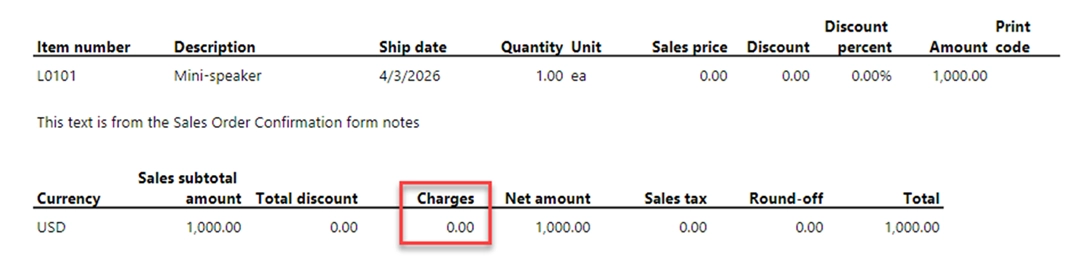
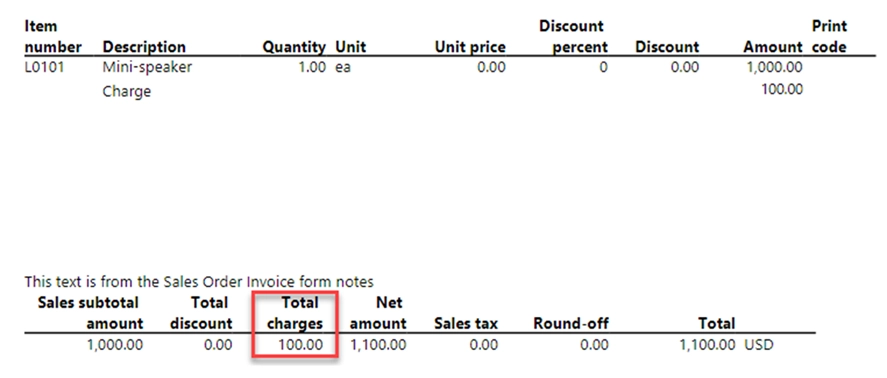
When the load is confirmed, the system transfers the costs to the order. When the invoice is generated, transportation costs are added to the sales order invoice, and the customer receives the final document including delivery cost.
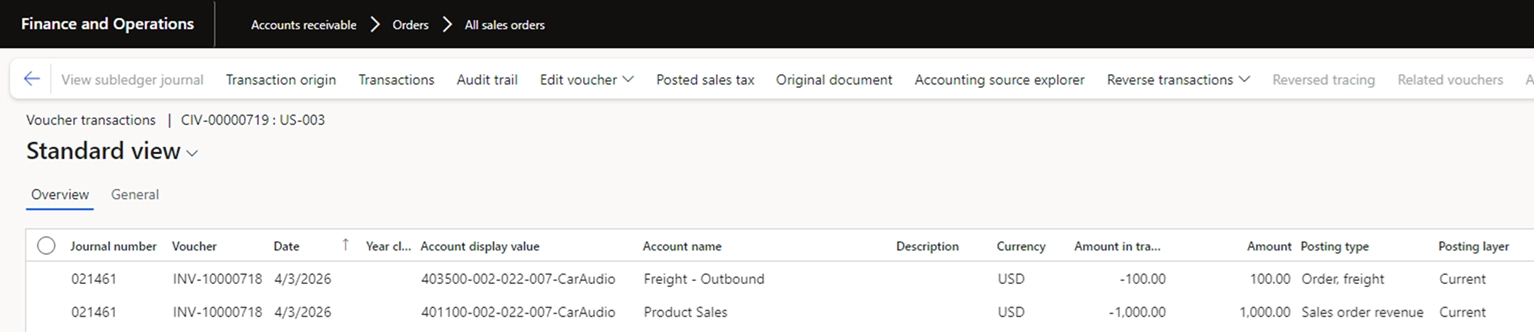
From an accounting perspective, the system creates a posting to the Sales order revenue account and a separate posting for delivery services to the Freight revenue account.
Delivery as a Separate Line
If delivery cost needs to be specified in advance – before order confirmation and shipment – the second option is used: allocating delivery as a separate line.
This model provides transparency of logistics costs and allows companies to manage delivery margin independently of the product. However, it can complicate the commercial offer and may increase customer sensitivity to delivery cost.
In the system, delivery as a separate line can be implemented in two ways:
- as a service item;
- through miscellaneous charges, for example using auto charges functionality.
If the delivery cost is agreed with the customer in advance, trade agreements for the delivery service item can be used, or auto charges can be configured.
If the cost needs to be calculated closer to shipment, the TMS module provides the Rate Route Workbench functionality for delivery cost calculation.
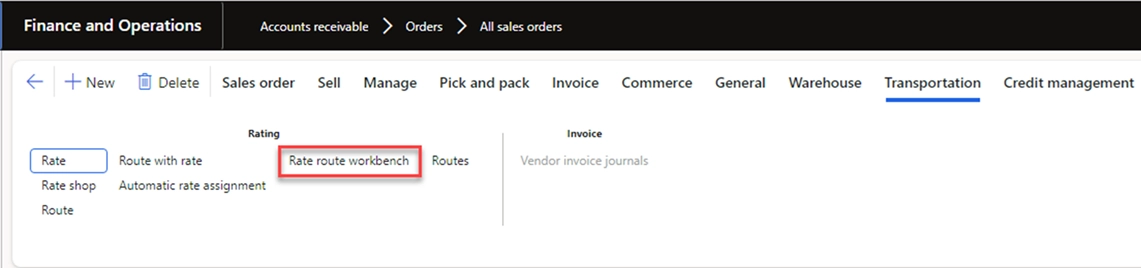
In this case, the calculated cost must be transferred to the sales order manually – either as a separate delivery service line or as charges.
It is important to note that the standard TMS module is primarily designed for the pass-through scenario.
The TMS module transfers costs to the order if the Add transportation charges to orders parameter is enabled for the delivery terms of the order.
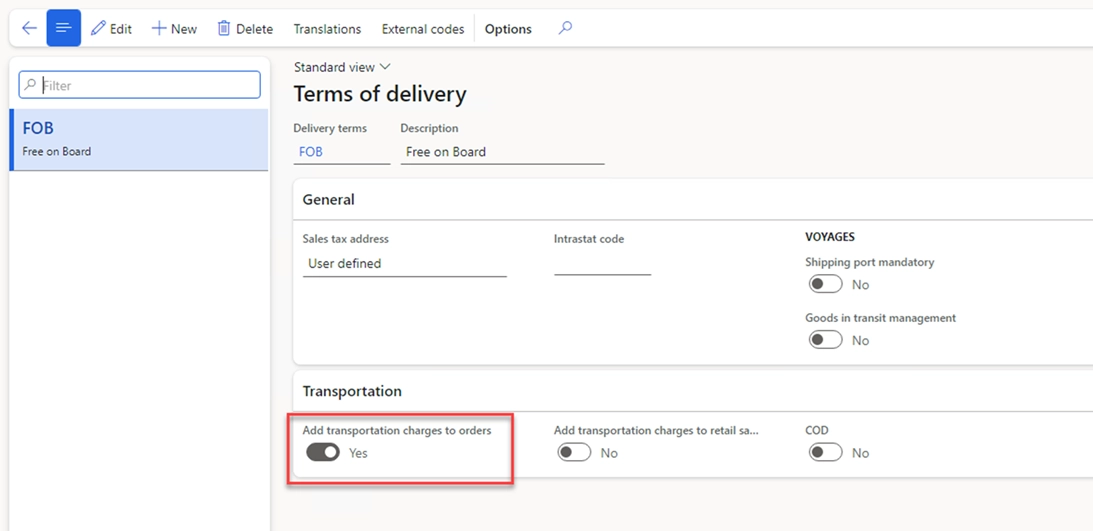
If the second approach is used and loads are applied to calculate carrier costs, the creation of miscellaneous charges at load confirmation must be disabled. At first glance, if the Add transportation charges to orders parameter is disabled, the system should not transfer costs to the order but should still create freight bills when route costs are calculated, enabling further settlement with carriers. However, in practice, the behavior is different: if this parameter is disabled and transportation costs are calculated for the load, the system neither creates miscellaneous charges for the order nor generates freight bills upon load confirmation. This complicates settlements with carriers.
[ICS] Transportation Package – our D365 SCM add-on solution – addresses this scenario by enabling controlled creation of freight bills and vendor invoices for carriers when delivery costs are handled as a separate line.
Delivery Cost Included in Product Price
Let’s consider the final option – when delivery cost is included in the product price.
This model simplifies the commercial offering and ensures a predictable final order price for the customer. However, it shifts the risk of logistics cost fluctuations to the company and reduces transparency of the price structure.
From a cost calculation perspective, this scenario is similar to the second option. However, there is an important difference compared to the first two models – accounting treatment in the general ledger.
The first two models allow companies to analyze delivery revenue and costs using separate general ledger accounts. For example, in the pass-through model, delivery revenue and cost may be equal, but movements are still visible in the Freight revenue account.
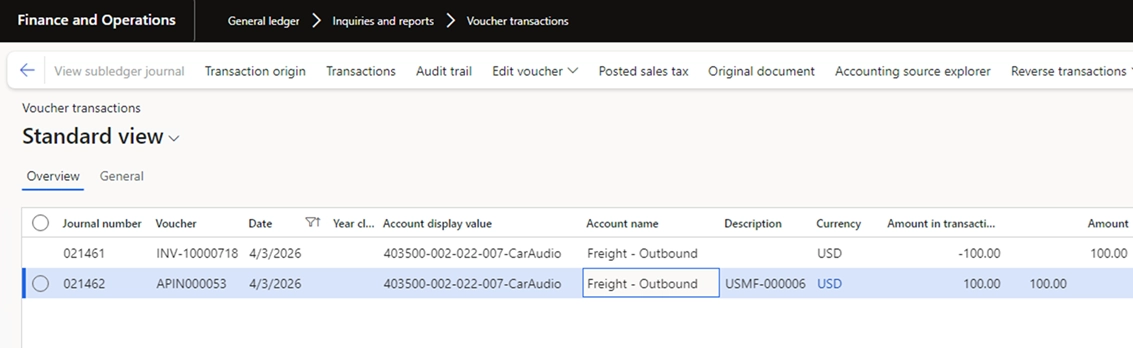
When delivery cost is included in the product price, the situation changes: delivery cost is effectively “embedded” in revenue. It is no longer treated as a separate revenue component but becomes part of the product margin. Based on the sales order invoice, the system creates a posting to the Sales order revenue account without generating a separate posting to the Freight revenue account.

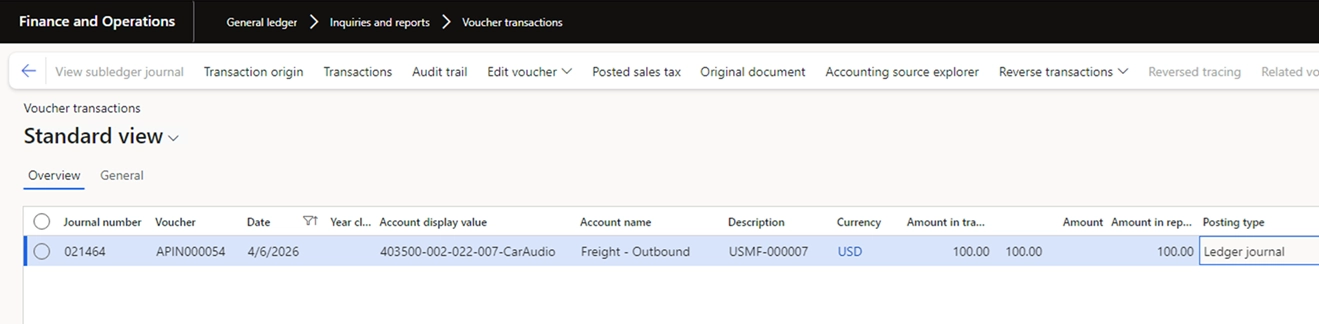
At the same time, delivery costs continue to be recorded in cost accounts, as in the other models.
Conclusion
This leads to an important conclusion.
If controlling delivery revenue and costs is important, it is better to use the first two approaches – pass-through or allocation as a separate line.
On the other hand, if a company works with stable customers, has regular deliveries, and faces low variability in logistics costs, including delivery in the product price becomes the simplest option for the customer – the total price is known in advance, making procurement planning easier.
In addition, it is worth noting that a company’s choice of delivery cost model depends not only on its business processes but also on the capabilities of its transportation management system.
Extending standard TMS functionality enables more flexible management of transportation planning, cost calculation, and cost transfer to sales orders.
In particular, our [ICS] Transportation Package add-on solution supports:
- route planning and transportation routing;
- assignment of transportation resources;
- calculation and allocation of transportation costs;
and provides more flexible handling of transportation cost scenarios, including separation of cost calculation, customer billing, and carrier settlement processes.
As a result, extending TMS functionality helps improve logistics efficiency and ensures accurate representation of transportation costs in the system.
To learn more about [ICS] Transportation Package, explore its features and book your live demo, please visit this section of our website. Or simply email us at: vip@ic-service.net.
Customize, optimize and unlock the full potential of your Dynamics system with our expert guidance.