


Port Call Automation with Microsoft Dynamics 365
Pavel Novikov, Senior Functional Consultant at Industry Consulting Service (ICS), examines how Microsoft Dynamics 365 Field Service and Business Central can be combined to enable efficient, end-to-end automation of port calls.
 02 Oct 2025





When automating business processes, companies often face the challenge of choosing the right system. Today, it is no longer necessary to look for a single universal platform to cover every process. In certain cases, a more effective approach is to select several specialized systems, integrate them, and build an optimal solution. This solution should not only provide core functionality but also support modern technologies such as AI and BI analytics.
Let’s take the example of a company that provides port agency services. The core of such a business is port call automation.

A port call refers to a vessel’s stay in port during a defined time window to perform required operations. To automate port calls, the system needs a document capturing the client, port, time frame, services, agent tasks, and reserved resources. Once services are delivered, the company must generate an invoice and send an e-invoice.
The integrator’s role is not only to automate client processes but also to identify the most suitable system or systems for the job. Within the Microsoft ecosystem, this can be achieved with Dynamics 365 Field Service (D365FS) and Business Central (BC).
Dynamics 365 Field Service is a Customer Engagement (CE) application built on Microsoft Dataverse and the Power Platform. It helps service organizations optimize service delivery by managing work orders, scheduling resources, and tracking task execution.
At the core of D365FS are Work Orders, which define all the details of the work to be performed for the customer: port call parameters, services, tasks, and assigned staff.
Out of the box, D365FS already supports port call automation through:
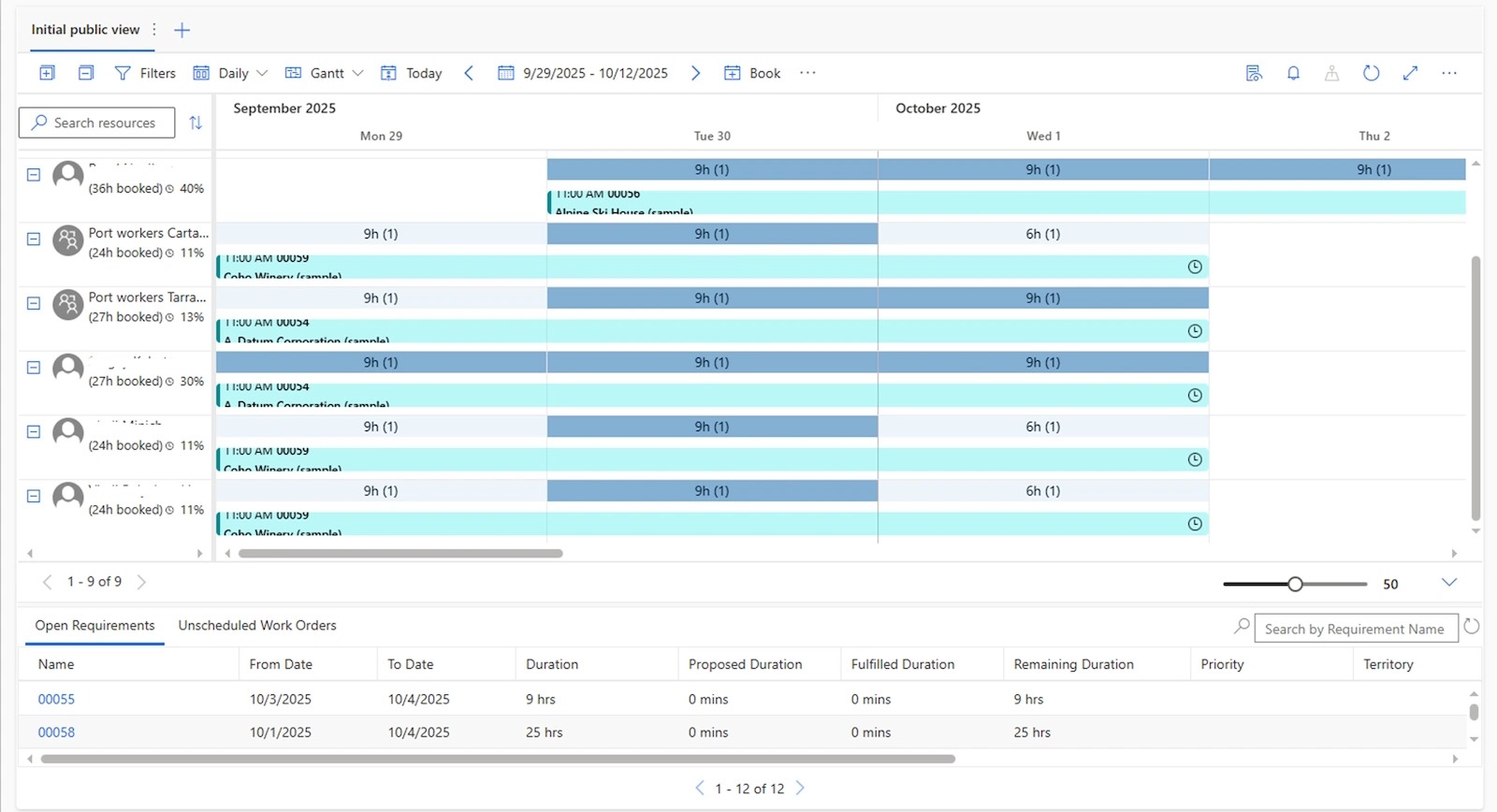
▶ Resource scheduling, managed with the scheduling board, schedule assistant, and Resource Scheduling Optimization add-in.
▶ Field Service Mobile App, which allows agents to track and complete assigned tasks.
▶ Invoicing, with the ability to generate and print invoices. However, for e-invoicing, a full accounting module is needed.
This is where Dynamics 365 Business Central comes in – a robust cloud ERP for managing financial and other business operations. BC integrates seamlessly with Field Service, extending automation to billing and finance.
Additional capabilities include:
- Copilot, which assists dispatchers and technicians by summarizing information about work orders and accounts, offering a natural language chat interface.
- Power BI integration, enabling interactive dashboards and reports on port call performance.
- Power Pages, which allows businesses to create secure external portals where customers can interact with port calls.
- D365 Field Service also includes lead and opportunity management, helping support business development and customer acquisition.
This case study shows how combining D365 Field Service and Business Central provides a complete, modern, and efficient solution for port agency companies without adding unnecessary complexity.

ICS: Microsoft Dynamics 365 Experts For Your Business
Here at ICS, we specialise in the implementation of Microsoft Dynamics 365 applications for companies across the globe. As expert D365 consultants, we can provide you with professional advice to ensure that you implement the best D365 package for your business needs. Moreover, we can help integrate Microsoft Dynamics 365 with your other IT systems to streamline operations and processes across your enterprise.
Contact the team at ICS to learn more about implementing Microsoft Dynamics 365 solutions for your business today.
Customize, optimize and unlock the full potential of your Dynamics solutions with our expert guidance.