


Rethinking Shortage Management in D365: From Standard Limitations to Advanced Solutions
Material shortages can be identified in Dynamics 365 SCM, but understanding their root causes remains a challenge. In this article, Margarita Purkova, Senior Functional Consultant at ICS, explains how to make shortage analysis more transparent and efficient in D365.
 17 Mar 2026







One of the key challenges for modern manufacturing companies is ensuring timely order fulfillment through effective management of production capacity, materials, and semi-finished goods. Efficient supply of production components directly impacts operational performance and overall competitiveness in the market.
Today, this challenge is particularly critical due to the dynamic nature of the global economy, which brings rapid and sometimes disruptive changes to supply chains, along with increased pressure to accurately assess order feasibility.

As experts in planning within Microsoft Dynamics 365, we continuously develop new tools to improve planning efficiency. In this article, we focus on identifying and managing material shortages using both standard system functionality and our custom [ICS] Shortage Management Solution.
Business Case
As an example, let us consider a manufacturing enterprise with complex multi-level bill of materials (BOM) structures that include raw materials, components, and semi-finished goods with different lead times and planning parameters.
The goal is to effectively manage material shortages at every BOM level and correctly assess their impact on the entire production process. It is important not only to detect shortages in a timely manner, but also to quickly understand the root causes of their occurrence in order to eliminate them promptly.
Standard D365 Functionality
Description
In the standard configuration of Microsoft Dynamics 365, the “Delay” and “Action” messages functionality plays a key role in the process of identifying problematic items and orders, while also generating recommendations for corrective actions.
For example, the system may suggest rescheduling an order or adjusting its quantity.
Being a powerful and indispensable tool for effective planning, this functionality has a number of limitations, which were identified by our team during the automation of planning processes at various enterprises.
Demo
Let us consider an item with a 10-level BOM containing 100 components. We create a sales order and analyze how the system calculates delay and action messages when two materials with long lead times exist at levels 8 and 10 in the BOM.
Step by step, we will examine how this scenario appears in the system and how a planner can interpret the data using standard tools for analyzing delay and action messages.
Step 1: Analyzing delays (Calculated delays form)
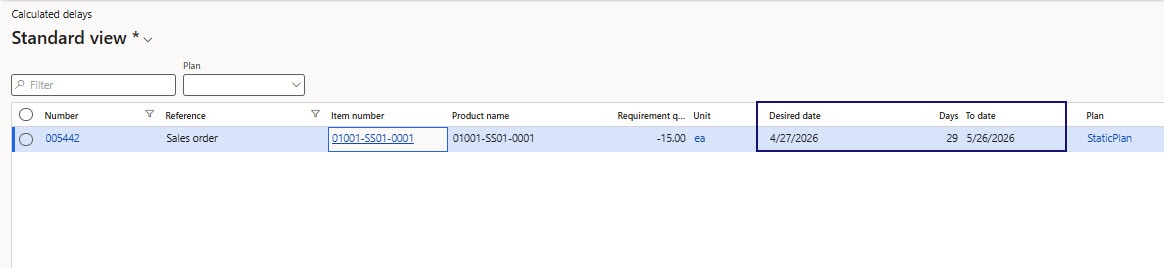
Within the standard system functionality, the analysis of orders with delays is performed manually.
To do this, the user needs to navigate to the “Calculated delays” form, where orders with recorded delivery deviations are displayed.
On this form, the user sees information about when the order can be fulfilled but does not receive information about the root causes of the delay or the data required for deeper analysis.
Step 2: Analyzing components (Explosion form)
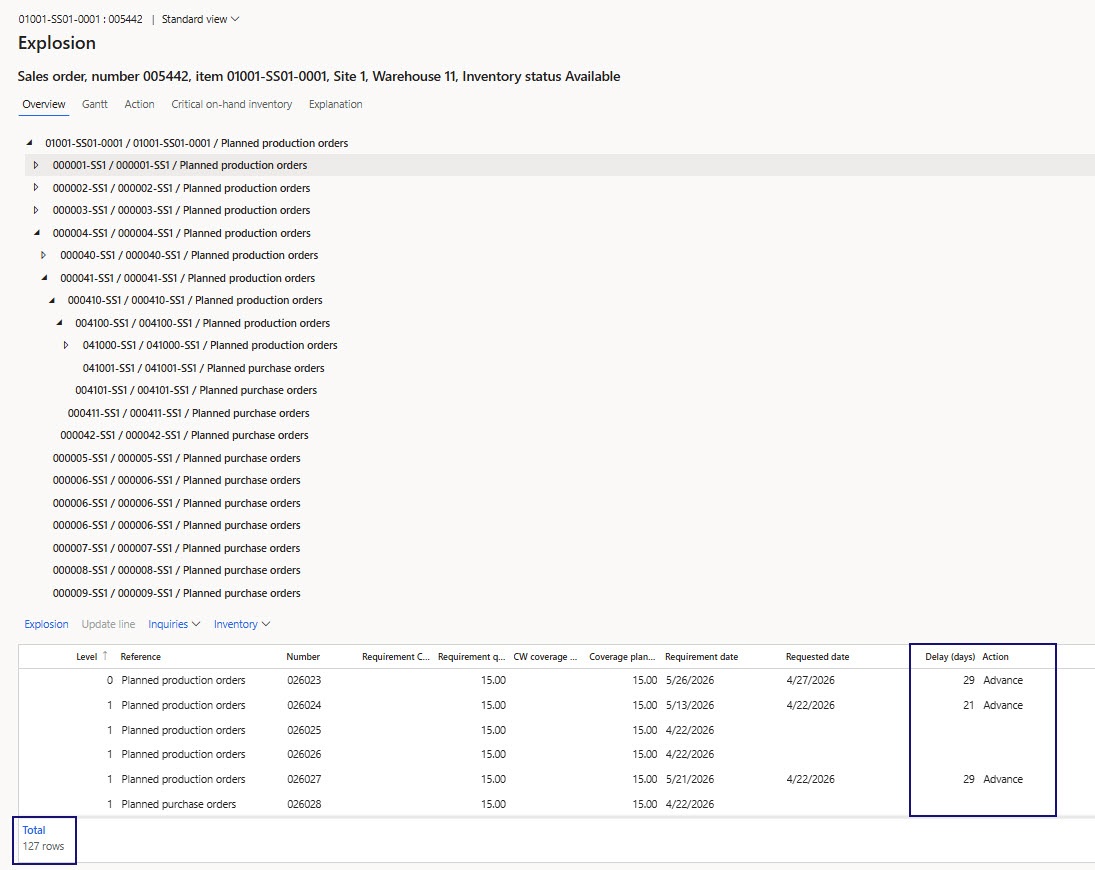
For further analysis, the user needs to navigate to the “Explosion” form, which presents a hierarchical structure reflecting all orders involved in covering demand, as well as information about each of them, including action messages and delay days.
However, the standard structure does not allow aggregation of data for problematic items, which complicates the quick analysis of delay causes.
Step 3: Identifying delay causes
It is not possible to directly determine the root cause of the delay in the “Explosion” form for our scenario (where the problematic components are at levels 8 and 10).
To determine the cause of the delay, the user must manually analyze dozens of related orders with more than 30 different messages, many of which are redundant or irrelevant.
Problems
Below are several reasons why the system generates excessive and/or irrelevant messages, which require additional user effort for manual analysis and correct interpretation.
- Multiplication of action messages across all BOM levels
In the case of composite items that include several levels of BOM nesting, if there is a material shortage at a lower level, the system will generate action messages for all levels of the BOM chain. - Multiple demands combined into one order
When one order covers multiple upper-level demands, the system generates a single action message based on the earliest order date. Such a message will only be relevant for the earliest order and does not provide practical value for other demands. - Action messages for production orders with capacity constraints
The system generates action messages both for material shortages and for insufficient production capacity. Looking at such a message, the planner cannot unambiguously determine its cause and must sequentially check both materials and production resources. - Past-due or incorrectly planned orders
For past-due orders or incorrectly planned orders, the system may generate unrealistic action messages, for example, Advance messages in the past. - Orders related to safety stock
In cases involving safety stock, the system may enter loops and generate excessive action messages that are not related to real demands and their coverage, in particular an excessive number of Cancel messages. This issue is especially relevant for Classic MRP, where action messages are generated for safety stock demand.
In all of the described cases, the user must manually trace relationships between hierarchy levels, sequentially analyze multiple related orders, and interpret a large number of action and delay messages to make the correct decision regarding required actions, such as splitting orders or reallocating resources. This requires significant time and a deep understanding of planning results.
Summary
The standard “Delay” and “Action” messages functionality is aimed at identifying deviations from planned delivery dates; however, it does not provide tools for interpreting and visualizing the obtained data. This complicates the analysis and identification of item shortages and their characteristics, as well as the identification of the root cause of delays.
[ICS] Shortage Management Solution
Description
Based on the analysis of the limitations of standard functionality discussed above, we developed our custom solution to improve the efficiency of working with orders that have material or resource shortages and therefore cannot be fulfilled on time.
The [ICS] Shortage Management Solution provides automatic shortage calculation and presents the data in a user-friendly aggregated format with the ability to visualize its distribution. This solution not only simplifies the analysis of shortage hierarchy but also provides the user with a complete understanding of where exactly in the order chain the problems occur.
The functionality is integrated with the Master planning module and supports two engines: Planning Optimization and Classical Master Planning.
As part of the solution development, a shortage calculation methodology was created, based on the sequential aggregation and analysis of Requirement transactions derived from generated action messages according to Reference, which allows obtaining complete information about shortages.
Solution Components
The [ICS] Shortage Management Solution includes several key components, each of which helps to effectively analyze and manage material shortages at all stages of the production process:
- Shortage calculation: Logic for collecting data on current shortage cases based on the new methodology and for generating a consolidated shortage report. This can be launched manually or executed periodically.
- Shortage report: A report containing data on current shortages, displaying additional information required for analysis.
- Shortage hierarchy: An aggregated hierarchical structure of shortages presented as a tree of problematic BOM components.
- Data visualization: Visualization of inventory distribution over time based on different parameters, taking into account minimum and maximum stock levels.
Demo
To demonstrate and compare standard functionality with our custom solution, we will use the same sales order that was used in the standard functionality example.
We will step by step review user actions in the system and show how the [ICS] Shortage Management Solution improves the process of delay and shortage analysis, accelerating root cause identification and decision-making.
Step 1: Analyzing shortage information (Shortages form)
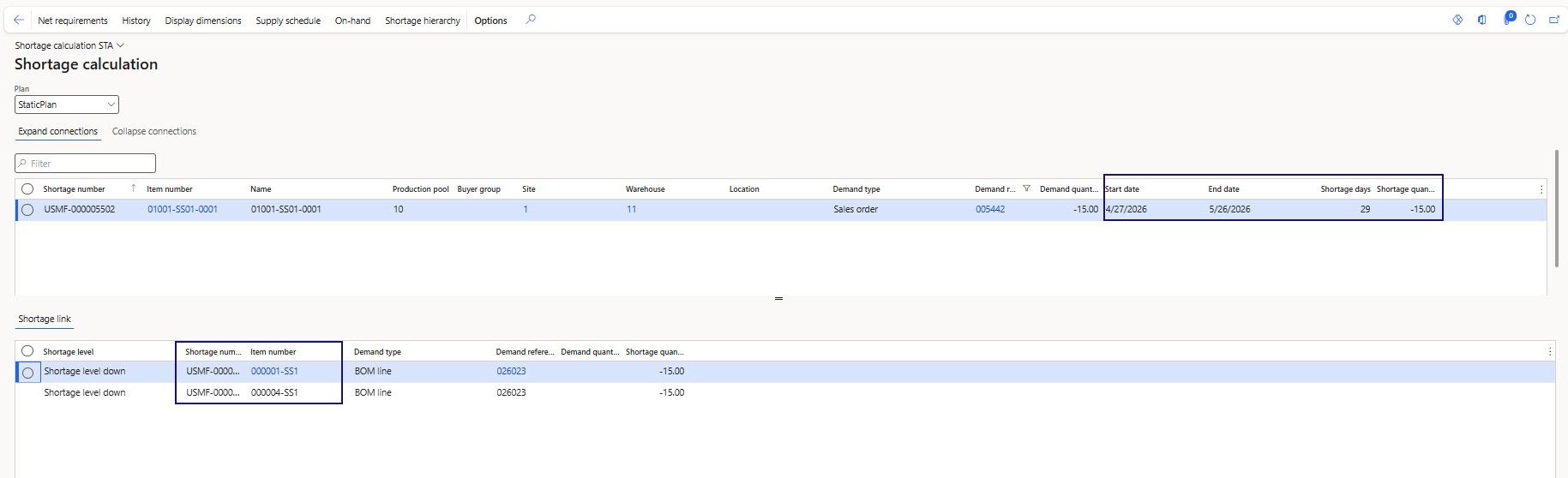
In the [ICS] Shortage Management Solution, to identify deviations from planned delivery dates, the user needs to navigate to the new “Shortages” form, where they can define the start and end dates of the shortage and see all relevant information.
The form displays shortages in both detailed and aggregated views. The detailed view displays shortage cases per demand. The aggregated view displays shortage information per item.
In addition, on the Shortage link tab, the user can see which upper-level orders are affected by the shortage and which lower-level orders contribute to it. This allows the user to determine at a high level which components in the order chain influence the shortage.
Step 2: Analyzing root causes (Shortage hierarchy form)
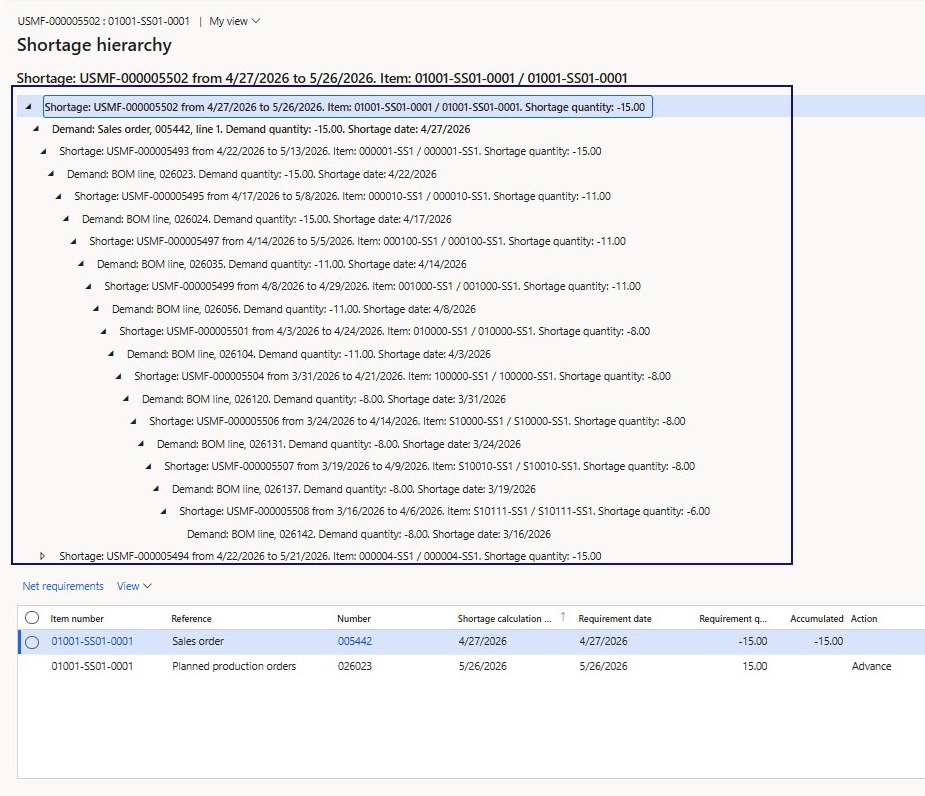
If the information on the Shortages form is not sufficient, the user proceeds to the “Shortage hierarchy” form.
This form is designed to provide all necessary information for shortage analysis.
It consists of three interconnected parts that simplify root cause identification and accelerate decision-making:
1. Shortage hierarchy
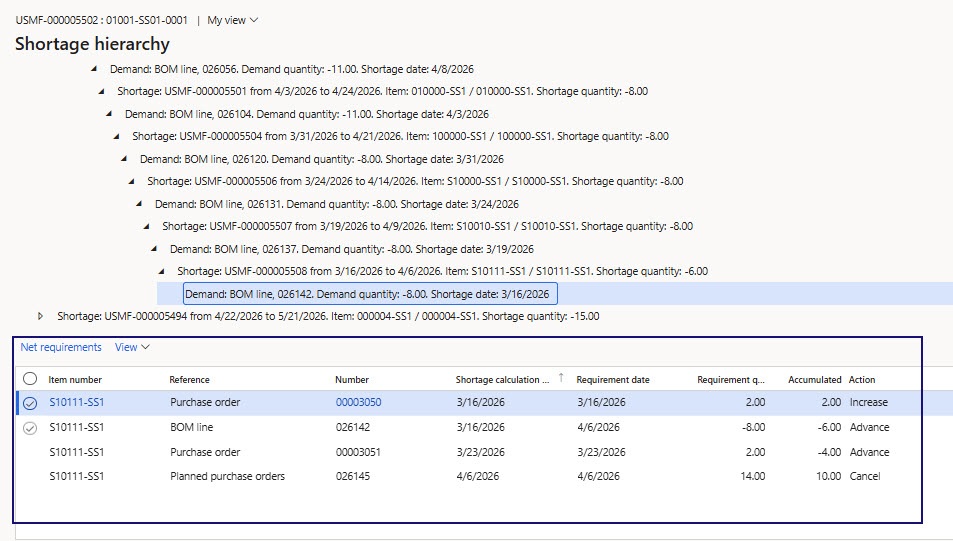
The Shortage hierarchy displays a hierarchical structure of component shortages in the form of a tree, showing how a top-level shortage is formed sequentially from lower-level component shortages.
Only problematic components with shortages and their descriptions are displayed, allowing the user to study the sequence of shortage formation and identify root causes.
The user no longer needs to manually aggregate data and process action messages.
2. Net requirements
In the “Net requirements” grid, the user sees requirement transactions that are considered in shortage formation.
For each transaction, the calculated “Shortage calculation date” is displayed, which serves as the base date for shortage formation.
Based on this information, the user can determine the cause of the shortage and make management decisions to resolve it.
3. Visualization
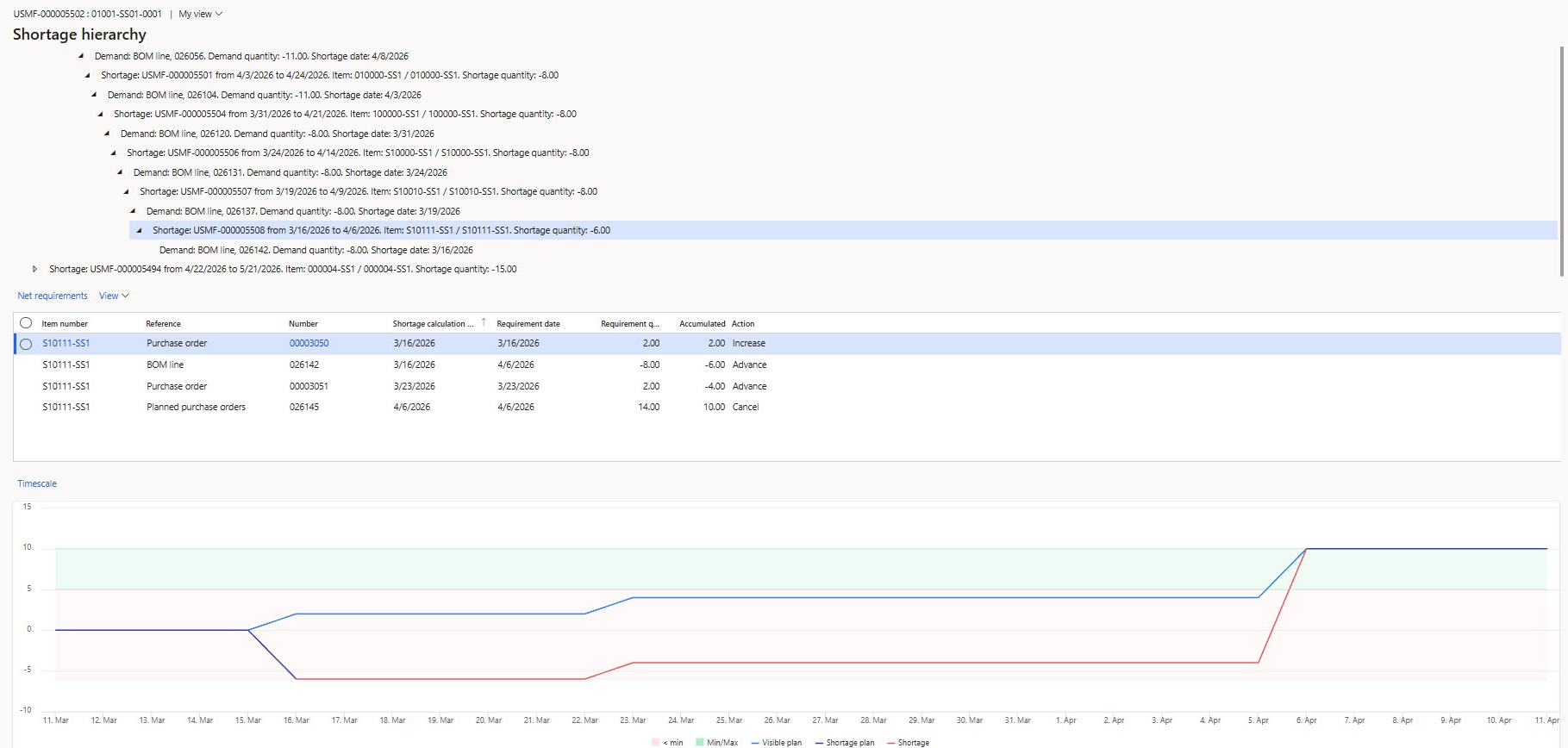
The Shortage hierarchy form includes visualization of item distribution over time with indication of minimum and maximum stock levels.
The following views are available:
- Visible plan: Displays how the item is distributed based on requirement transactions according to the Requirement date.
- Shortage plan: Displays how the item is distributed based on requirement transactions according to the Shortage date.
- Shortage: Displays item distribution considering only the requirement transactions that generate the shortage.
Results of Using the Solution
The use of this custom solution significantly reduces the time required to identify the root causes of delays.
With the help of hierarchical structure, shortage aggregation, and data visualization, it becomes easy to understand which components need to be immediately reallocated to avoid delivery delays.
On the Shortage hierarchy form, using hierarchical structure and graphical representation, the user can quickly identify and obtain information about the actions required to eliminate the shortage.
For example, for one problematic material, it can be seen on the screenshot below that to fulfill a sales order on time, it is necessary to replenish stock by 6 units before March 16.
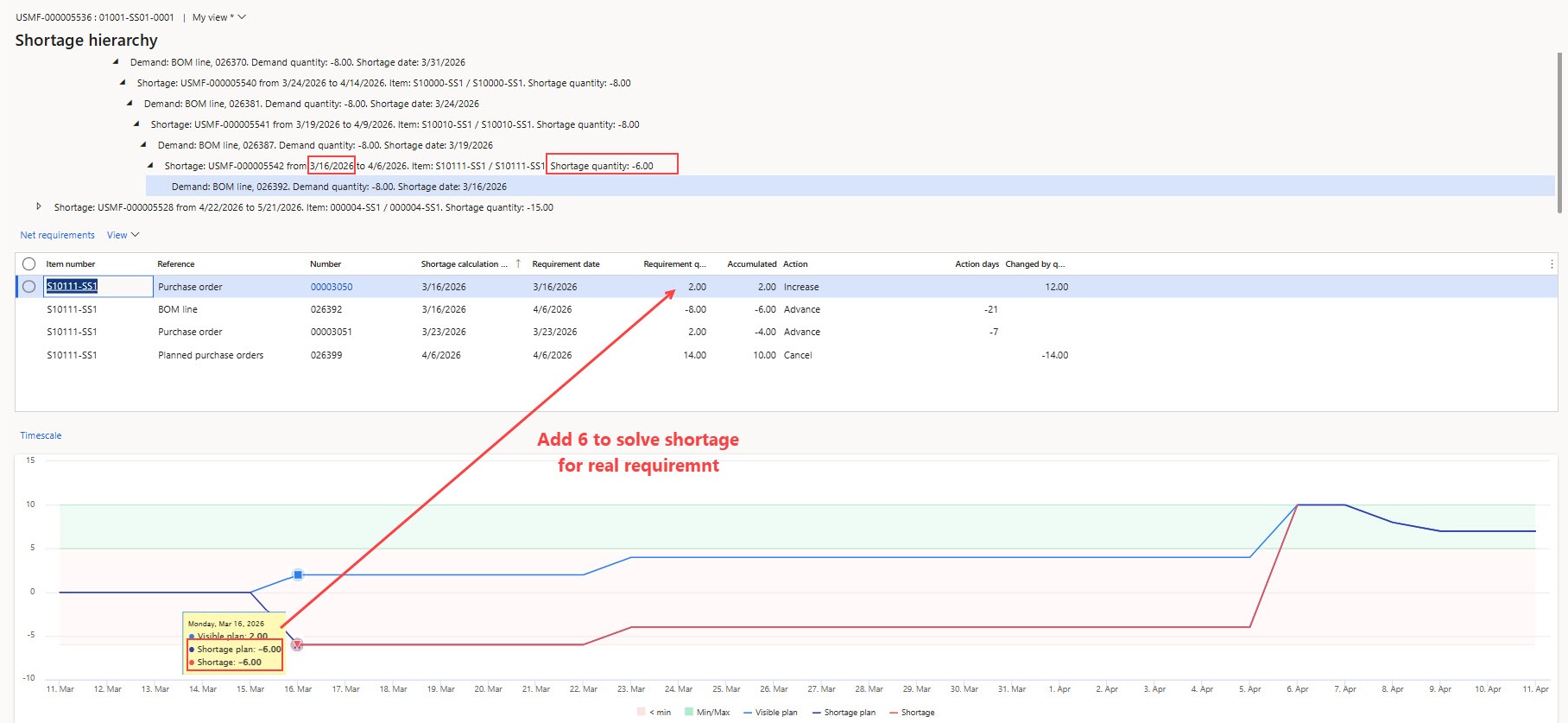
Based on this information, the user must either resolve the shortage or reschedule the upper-level orders associated with it, having full visibility of which specific orders are involved in forming this demand.
Benefits
Among the advantages of the [ICS] Shortage Management Solution, which contribute to improving the analysis of problematic items and orders that cannot be fulfilled on time, the following can be highlighted:
- Simplified analysis with clear visualization. The user receives all the necessary information about shortages in an aggregated hierarchical structure, which helps quickly identify the root causes of delays without the need to manually trace all order levels.
- Systematic calculation based on up-to-date data. The shortage calculation functionality is configured to run automatically immediately after Master Planning execution. This means that shortage calculation is always based on the latest planning results, significantly improving the accuracy and relevance of the data obtained.
- Improved planning accuracy. Automatic calculation and consolidation of dozens of messages significantly reduce the likelihood of errors that typically occur when manually processing large volumes of information.
- Reduced manual effort. Automation of routine operations, such as identifying problematic orders and analyzing action messages, reduces task execution time and minimizes the need for user involvement.
- Increased reliability of order fulfillment. Early identification of problematic components reduces the risk of delays and provides companies with an advantage in decision-making.
Summary
The [ICS] Shortage Management Solution optimizes the process of analyzing problematic items and orders that cannot be fulfilled on time. It eliminates the limitations of standard functionality, such as the complexity of interpreting messages caused by their redundancy and irrelevance. And through automated shortage calculation, data aggregation, and visualization, users gain the necessary insights to quickly analyze delay causes.
Our solution helps you take prompt actions, minimize the risk of delays and increase process transparency, ultimately improving order fulfilment and your company’s competitiveness in the market.

To learn more about [ICS] Shortage Management Solution, explore its features and book your live demo, please visit this section of our website. Or simply email us at: vip@ic-service.net.
Customize, optimize and unlock the full potential of your Dynamics system with our expert guidance.