


AI-powered D365 Monitoring: How Copilot Helps Resolve Incidents Faster
ERP system stability depends on timely detection and resolution of background process failures that often go unnoticed. In this article, we show how Copilot brings intelligence to our [ICS] Monitoring Tool, making error analysis and response in Dynamics 365 smarter and more efficient.
 30 Oct 2025







Behind Every Stable ERP System Stands Reliable Monitoring
Every minute of downtime in a Microsoft Dynamics 365 system can result in profit loss, delays, and decreased customer satisfaction. Many issues aren’t immediately visible because batch processes run in the background – yet they play a critical role in updating data, launching calculations, and verifying information. When something goes wrong, the impact is felt instantly.
Delays, errors, or failures in batch processes can lead to tangible problems:
- Missed deadlines and unhappy customers
- Incorrect reports and the risk of poor business decisions
- Extra costs for troubleshooting and recovery
- SLA violations and compliance risks
In one of the previous articles, we introduced our [ICS] Monitoring Tool – a solution that helps control the execution of batch jobs in Dynamics 365 and minimizes the above risks through:
- Real-time monitoring
- Instant error notifications
- Analysis and visualization of error statistics
- Process and resource optimization
However, even with all the capabilities of the Monitoring Tool, analyzing and responding to errors still requires human involvement. To make this process faster, simpler, and more automated, we’ve integrated Copilot, which now helps users not only detect errors but also understand and resolve them quickly.
Key Tasks Solved by Copilot
The integration of Copilot into the Monitoring Tool has made error analysis in Microsoft Dynamics ERP not only faster but also smarter. The system no longer just reports problems – it helps interpret and resolve them before they affect business operations.
Copilot addresses key support challenges by:
- Providing recommendations and step-by-step instructions for fixing detected issues
- Quickly retrieving error statistics without the need to examine logs or reports
- Reducing manual effort and minimizing human error
Today, Copilot operates in two primary scenarios – both aimed at improving the efficiency and transparency of monitoring.
Scenario 1: Smart Error Summaries
Copilot analyzes data from the Monitoring Tool and generates focused, easy-to-understand reports directly in Microsoft Teams. Support teams no longer need to open dashboards or reports – they can simply type a request in their usual support chat and instantly receive a clear and concise summary of errors.
When a user enters the keyword “Copilot summary”, the system gathers statistics from the Monitoring Tool, analyzes them, and returns the results in the same chat. Within seconds, Copilot provides key insights: the total number of errors, most frequent error types, affected batch jobs, occurrence times, and recurring patterns. This allows support teams to see the overall picture and identify where the main risks are concentrated – without digging through logs or complex filters.
Below is an example message from Copilot:
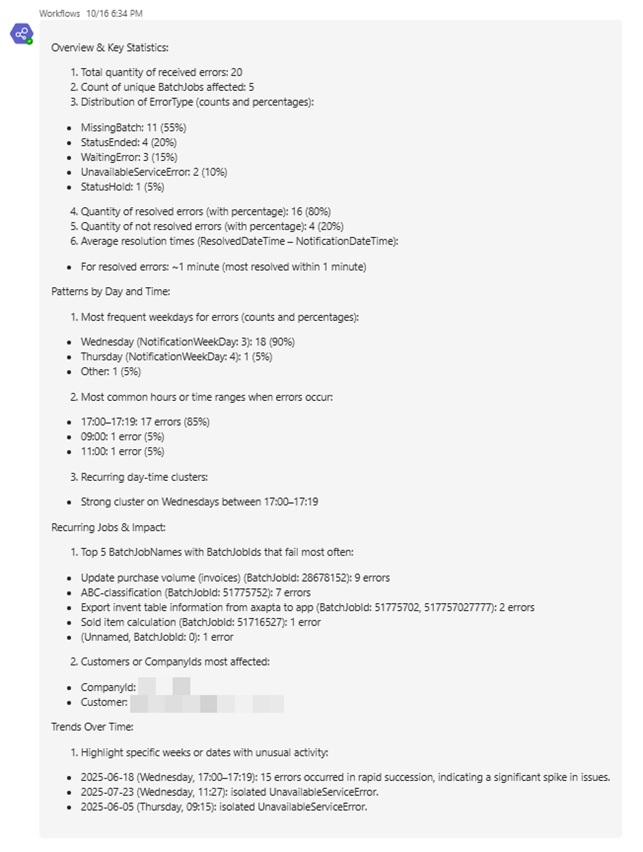
This format enables support and analytics teams to quickly assess the situation, make informed decisions, and act proactively without wasting time on routine checks.
Scenario 2: Recommendation-based Notifications
When an error occurs, Copilot automatically analyzes it and sends a notification to the appropriate team directly in MS Teams. Along with a description of the problem, users immediately receive short, actionable recommendations without having to open extra reports, search for troubleshooting guides, or manually identify the root cause.
As soon as the Monitoring Tool detects a failure, error data is passed to Copilot, which evaluates the context and generates a clear message. Within seconds, it appears in the team chat and includes an error description, probable cause, and suggested resolution steps.
Example notification:
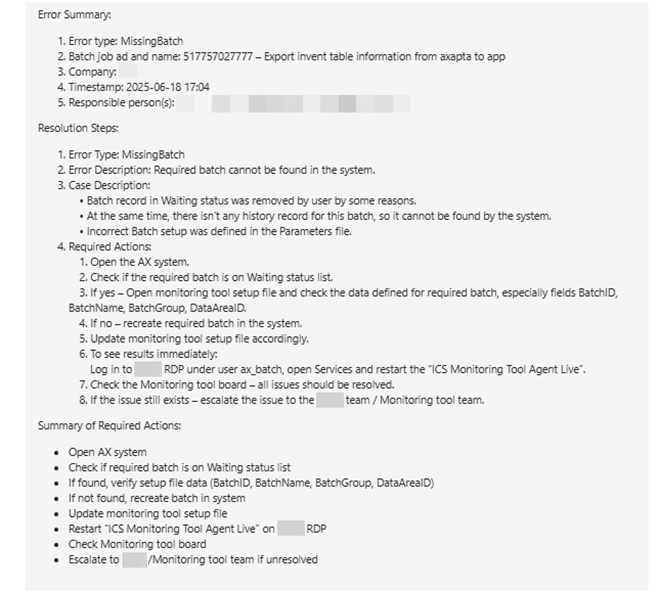
This enables the support team to instantly understand what happened and what actions to take next. As a result, response time decreases, and the number of recurring errors drops significantly.
Copilot turns a standard error notification into a meaningful, actionable insight – helping teams not just register incidents but actually prevent them.
Business Impact
Integrating Copilot into [ICS] Monitoring Tool transforms error management from a cost-driven process into a source of efficiency and confidence in ERP system stability. Incident response becomes predictable, fast, and transparent – rather than stressful and time-consuming.
Companies gain tangible benefits that directly impact business performance and system reliability:
✅ Reduced Error Analysis Time. Copilot automatically analyzes and explains the causes of failures, providing clear real-time recommendations. This significantly shortens the time required to identify and diagnose issues.
✅ Faster Business Process Recovery. Errors no longer create bottlenecks – notifications and fix suggestions arrive instantly. That means less downtime and smoother operation of key processes.
✅ Transparency and Improved Team Collaboration. Copilot creates a unified information space in Microsoft Teams, where all stakeholders can see current statuses, analytics, and resolution steps. This enhances teamwork and minimizes misunderstandings.
✅ AI Without Complex Integration. No lengthy implementation or training is needed – everything works within the familiar Microsoft Teams environment. Copilot starts delivering value immediately as a natural part of the workflow.
Conclusion
Integrating Copilot marks a step toward a new level of intelligent solutions where technology doesn’t replace people but amplifies their capabilities.
Our goal is to create tools that not only automate processes but also empower teams to make decisions faster, more accurately, and with greater confidence. [ICS] Monitoring Tool with Copilot is a prime example of how artificial intelligence becomes an integral part of everyday work – helping teams see more, respond faster, and achieve better results. But the work doesn’t stop here – we continue to enhance the solution, adding new scenarios, analytics, and AI models so our clients can focus on business growth rather than troubleshooting.
If you want to make your Dynamics 365 process management even smarter, we’ll be happy to show how Copilot can help your company. Simply contact our team for details.
Customize, optimize and unlock the full potential of your Dynamics system with our expert guidance.