


External Logistics Centers in D365FO (Part 3)
In Part 3 of the article, Sergey Kebets, Senior Functional Consultant at ICS, concludes his examination of various instruments in the D365FO system for working with external logistics centers.
 21 Sep 2023






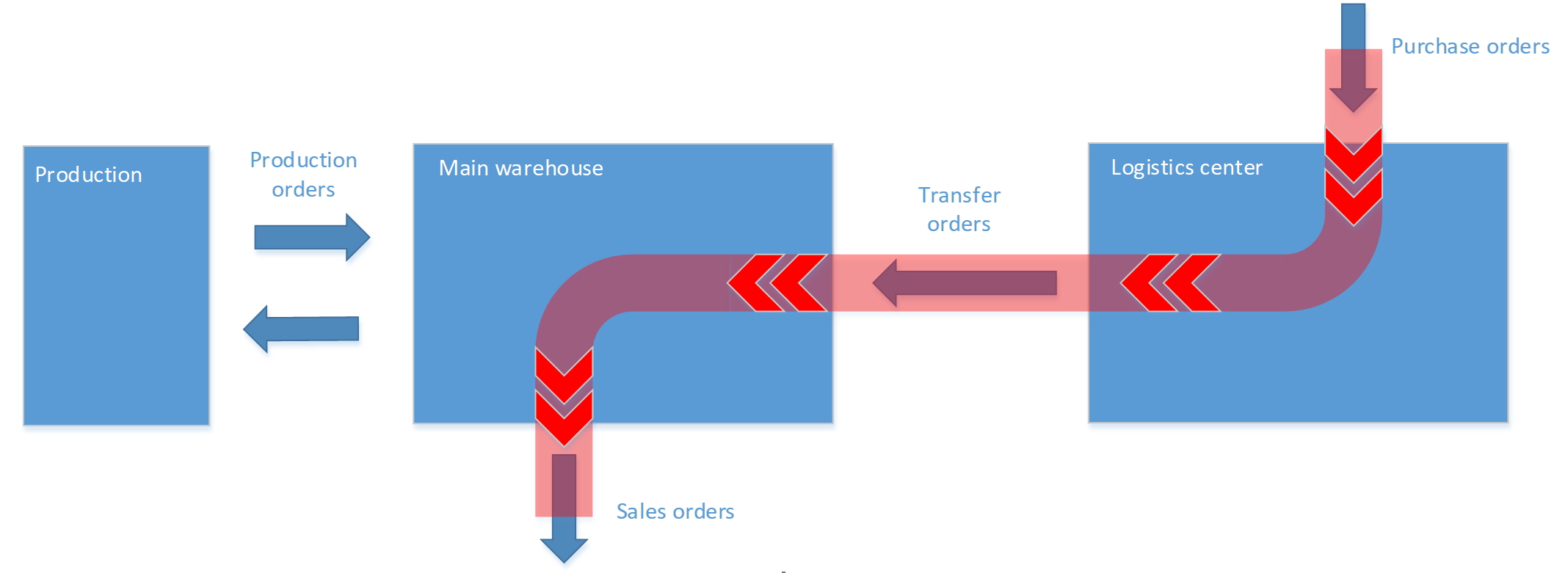
In the scope of the previous articles (Part 1 and Part 2), we discussed the capabilities of the D365FO system for supporting the process of keeping production in external logistics centers. We have identified two schemes of interaction with logistics centers:
Direct scheme:
Complex scheme:
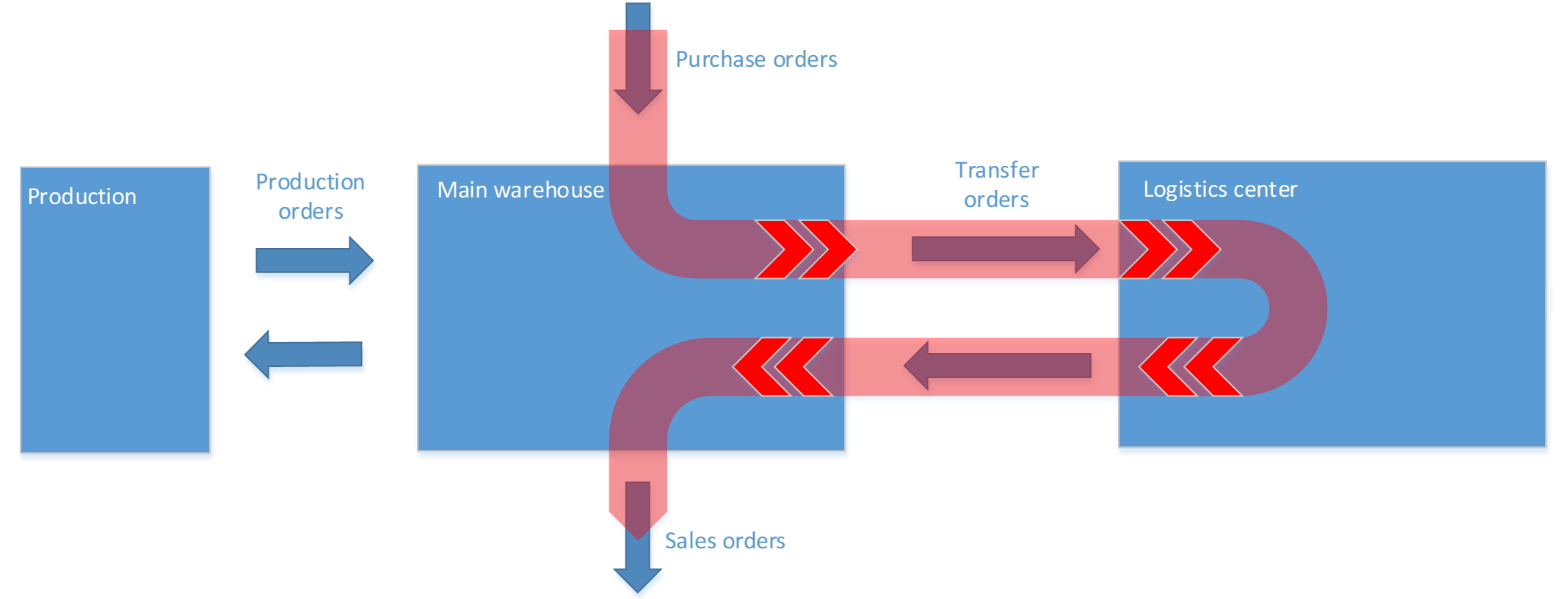
The Direct scheme can be covered by the standard functionality, and you can find the details of the configuration in the first part of this article. At the same time, the Complex scheme cannot be covered by the standard functionality. The system has some limitations for implementing this scheme. We discussed these limitations in the scope of Part 1 of the article. I would single out two groups of limitations:
- Transfer planning
- Stock prediction
In this Part 3 of the article, we will look at solutions that allow you to get around these limitations of the standard functionality.
Theory
After we have identified the groups, let’s discuss the possible changes in the system that can act as workarounds for these system limitations.
The transfer planning limitations are related to the inability to create looped coverage groups in the standard functionality. Here, a possible solution could be a new functionality that can analyze demands and load levels in the main warehouse and decide to move some products to or from an external warehouse. This functionality should be tasked with solving the following:
- Control load levels in the warehouse and plan transfers to the logistics center to avoid slowing down warehouse processes;
- Analyze the demands from Sales, Purchase, Production, and Inventory modules, and plan transfers for covering these demands;
- Control load levels in the warehouse and plan transfers from the logistics center if there is free space in the main warehouse.
These issues and possible configurations are described in detail in the first part of the article.
The stock prediction functionality is not presented in the system. It means that there are no instruments in the system for constructing a forecast of the utilization of the warehouse capacities by the on-hand in the future. As a result, we cannot open one form in the system and check what we will have in stock next Friday and what effect this will have on the warehouse. For solving these problems, we have implemented a new functionality that allows you to solve the following:
- Collect the analytics about the current utilization of the warehouse in Pallets, Volume, and Weight;
- Construct a forecast of the utilization of the warehouse to a given horizon;
- Provide the possibility to construct a forecast for existing and planned orders;
- Provide the analytics for different Master plans;
- Take into account in the calculations the physical limitations of the warehouse for the acceptance and shipment of products per day or shifts.
With the realization of these features, the user gets the instrument for a deeper understanding of the processes taking place in the warehouse. At the same time, a slice of data appears in the system that allows to plan the movement of products to external warehouses based on the current or planned load of own warehouses.
These issues and possible configurations are also described in detail in the first part of the article.
Let’s look at solutions that can solve these problems in Dynamics 365 for Finance and Operations.
Practice
In practice, implemented solutions can be used for solving different cases, but let’s look at the ability of functionality from the point of view of the following case:
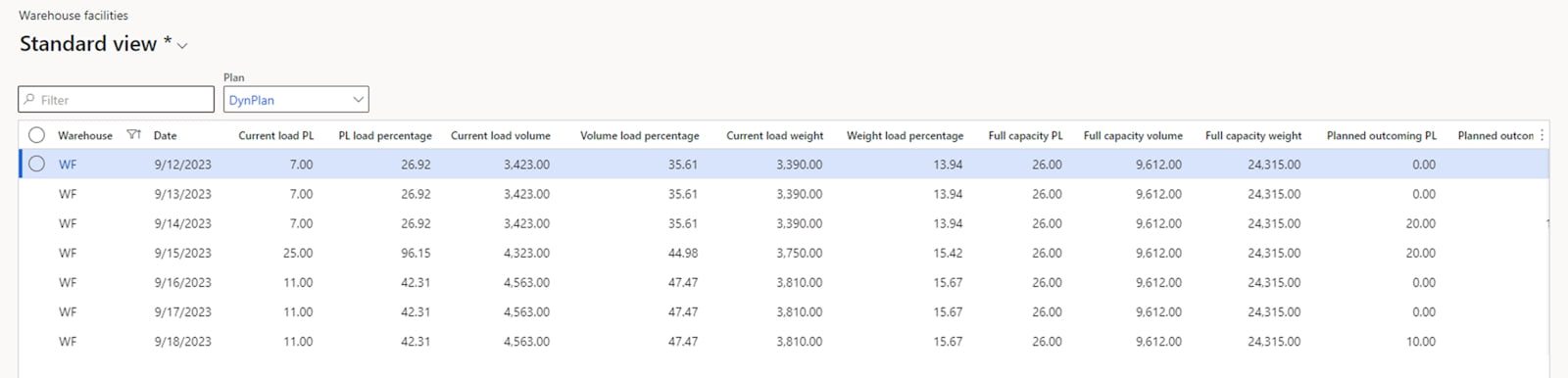
The company has its own warehouse for 26 pallets, 24315 maximum weight, and 9612 volume pieces. Currently, the company keeps 7 pallets in the warehouse. It is 3423 volume pieces, and 3390 weight pieces. In the near future, some incomings and outgoings are planned. We know the date (9/14/2023), but we don’t know the volume of these movements. The user wants to know the volumes of the planned transfers and check the load on the warehouse taking into account these transfers.
For solving such cases, we have implemented the Warehouse Facilities functionality in D365SCM. This functionality is a part of the [ICS] Warehouse Package. The Warehouse Facilities functionality provides a special form where the user can check load levels of the warehouse. The form was added to the Warehouse Management module. Below you will find an example of the form for our case.
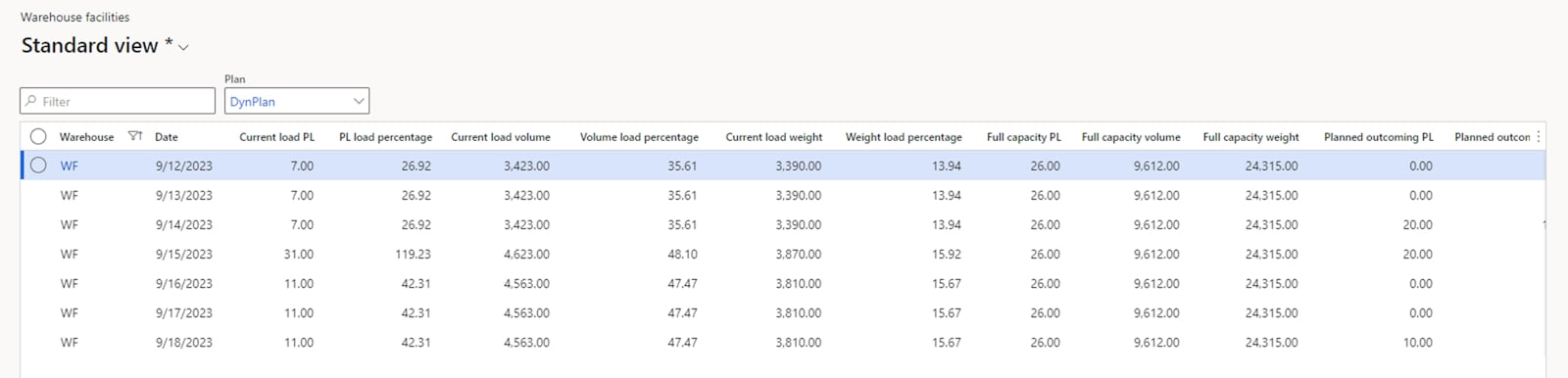
On the form we can see a separate line for each date. Also, we can see the data prepared in the following dimensions:
- PL (Pallets)
- Volume
- Weight
For each dimension the system calculates the full capacity, currently occupied values, and the ratio of the current value to the full value in percentages.
As you can see in the screenshot, currently we are not using the warehouse capacity optimally. Only 26,92% of locations are loaded (the 4th column). However, in a few days (the 4th line) the warehouse will be overloaded. The system informs the user that on this date the forecast pallet load is 119.23% of the maximum warehouse load. At the same time, we don’t expect to exceed the load in terms of weight and volume. Based on this information, the user can decide to replan some incomings or move some products to another warehouse to avoid blocking situations in the warehouse.
After these changes, the user should update the data on the Warehouse facilities form and check the result. Here, I should describe the base principles of collecting data. On the high level, the system checks the on-hand, incomings, and outgoings on the first date. The on-hand of the next date is the result of the following operation: on-hand minus outgoings plus incomings. In turn, incomings may include real orders (Purchase orders, Transfer orders, Production orders, etc.) and Planned orders (Planned purchases, Planned transfers, Planned productions, etc.). The outgoings may include real orders (Sales orders, Transfer orders, Production orders, etc.) and Planned orders (Planned transfers, BOM lines for planned products, etc.).
The system will perform these calculations for each date throughout the specified date horizon. This update can be performed both in batch mode and manually. It is assumed that the data will be updated on a daily basis in batch mode and the user will have the refreshed data for analyses.
For our example I have changed the delivery date for part of the Purchase order, and after the refresh of the data, we can see the following picture in the warehouse:
As you can see, we don’t have exits beyond maximum load. It means that the warehouse will work in a normal regime without any overloading.
For solving the Transfer planning issues, we have implemented the [ICS] Logistics Center solution. This solution includes the functionality for planning the transportation to a logistics center and from a logistics center.
Let’s take a closer look at our solution by processing the same case:
The company has its own warehouse for 26 pallets, 24315 maximum weight, and 9612 volume pieces. Currently, the company keeps 7 pallets in the warehouse. It is 3423 volume pieces, and 3390 weight pieces. In the near future, some incomings and outgoings are planned. We know the date (9/14/2023), but we don’t know the volume of these movements. The user needs to analyze the load on the warehouse for the period till 9/18/2023 and plan the movement of excess products to and from the logistics center (LC).
The Functionality can be launched both with the standard master planning (MRP) and separately:
- Master planning. The user can activate transfer calculation to LC and from LC for the Master plan. For this, we have added two checkboxes on the Master plan: Calculate transfer to logistics center and Calculate transfer from logistics center. If both checkboxes are activated, the system will perform calculations for transfers to LC before the standard master planning and perform calculations for transfers from LC after the standard master planning.
- Logistics center planning dialog form. From the dialog the user can launch the calculation both in manual mode and in a batch job.
In both cases the system will do the same. Let’s process our case using the master planning functionality.
First, two new checkboxes on the Master plan form – Calculate transfers to logistics center and Calculate transfers from logistics center – activate calculations for movements to and from the logistics center.
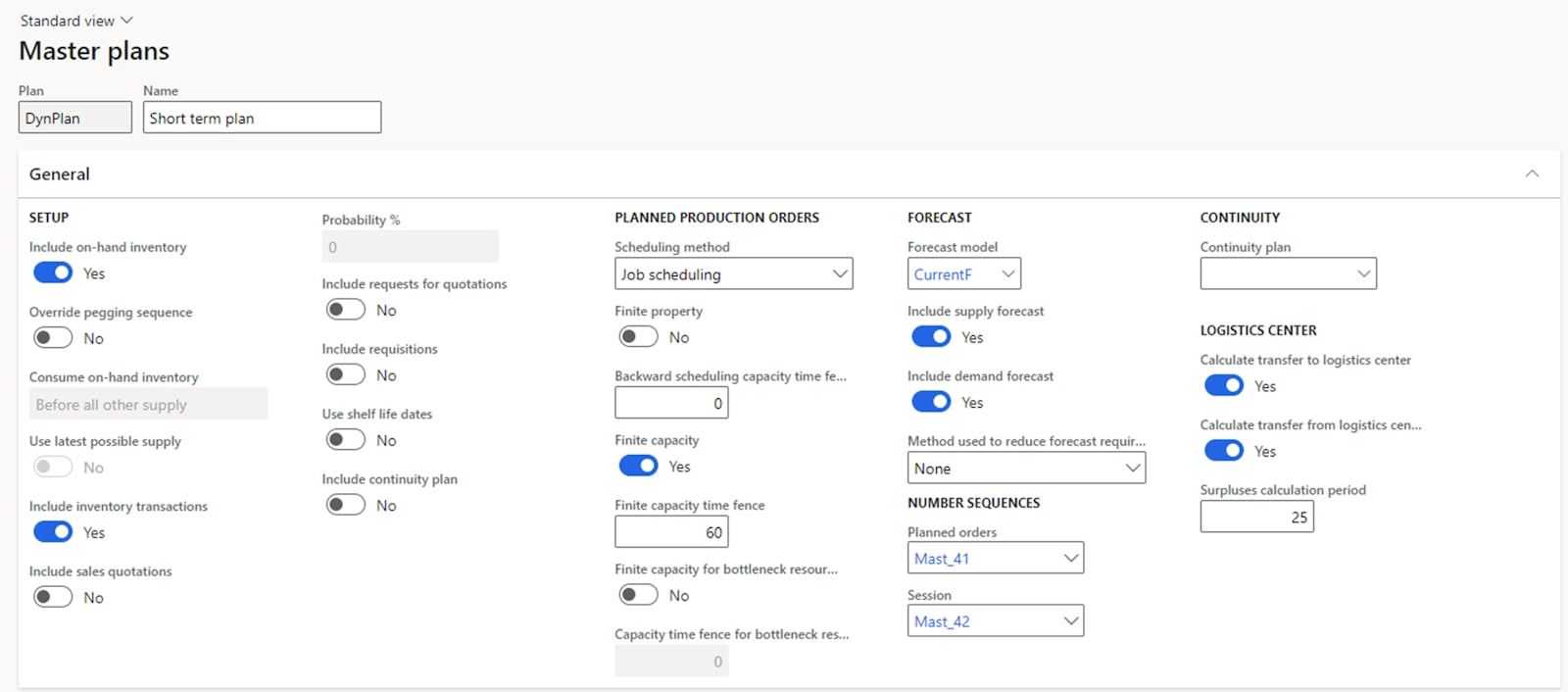
After the user launched the Master planning calculation, the system will analyze all demands on the main warehouse for the horizon configured on the Master plan in Surpluses calculation period field. If the system finds the on-hand that we are not going to use in this period and the load level is more than predefined for the warehouse maximum, the system will generate the planned transfers for products that should be moved to logistics centers.
In our case we predict the following picture in the warehouse:
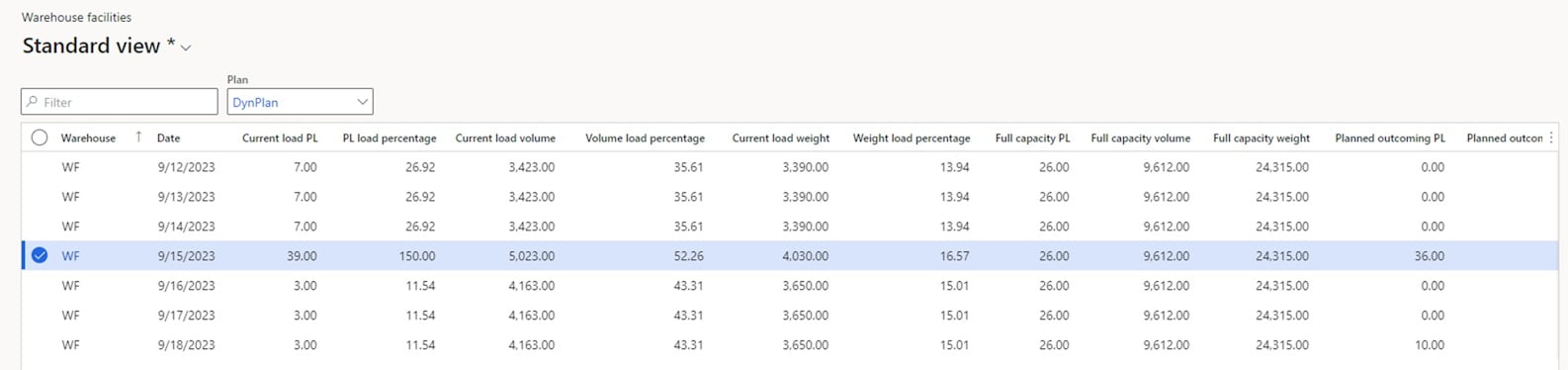
It looks like in a few days the warehouse will be overloaded with 50% more pallets than the full load. The system found this situation and proposes the transfer to the user. For this, the system generates Planned transfer orders with products that should be moved to the logistics center.
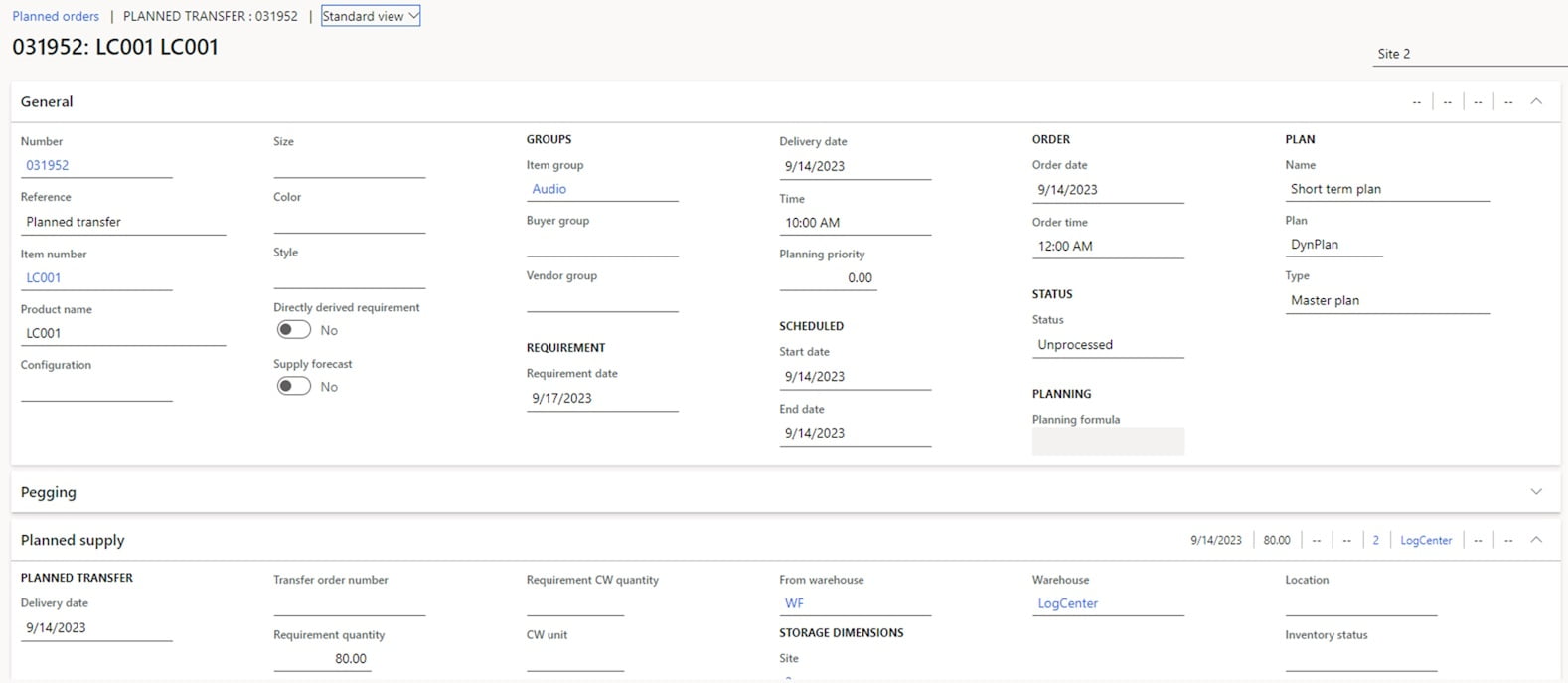
The user just needs to check these planned transfer orders and firm them. After doing this, we get the standard transfer order that should be performed by warehouses and the Transfer process to LC is finished on this.
For planning transfers from the logistics center, the system analyses the demands on the main warehouse and planned transfers for necessary products. As a result of this operation, the system proposes Planned transfer orders to the user.
Afterwards the process looks the same. The user should firm the Planned transfer order and transform it into the Transfer order. The warehouse workers should perform the Transfer order and thereby the process is finished.
Summary
[ICS] solutions provide functionality that fully automate the transfer planning process. With these extensions, the system can plan transfers to logistics centers with minimal user intervention. The user only needs to start the planning procedure and confirm the planned orders.
The solutions can work separately. The Warehouse Facilities solution provides an additional very important point of view on the on-hand – how the on-hand utilizes the warehouse. With this instrument, the business can make smarter logistics decisions. The Logistics Center solution provides functionality that almost fully automates the planning process of transfers to and from logistics centers. But together these functionalities provide tailored functionality that can automatically plan transfers based on demands and warehouse facilities.
Afterword
With this Part 3, we conclude our series of articles dedicated to working with external logistics centers in D365FO. If you want to know more about our solutions or have any questions related to issues raised in the articles, please feel free to contact us in any way convenient for you.
Customize, optimize and unlock the full potential of your Dynamics solutions with our expert guidance.