


Route Creation and Cost Calculation for Different Types of Transportation in D365 SCM
Pavel Novikov, Senior Functional Consultant at ICS, discusses route creation for different types of transportation and transportation cost calculation in the TMS module of D365 SCM and looks at some important details.
 23 Mar 2023






In this article, I will discuss route creation for different types of transportation (full truckload, less-than-truckload and parcel) and transportation cost calculation in the TMS module of Microsoft Dynamics 365 Supply Chain Management (D365 SCM), while focusing on some important details.
The Rate Route Workbench functionality of the TMS module allows you to search for available routes for your load and calculate costs for those routes. The route (the physical path of a shipment from origin to destination) can be simple, consisting of one route segment (departure address of the shipping warehouse, arrival address of the consignee), or complex, consisting of several segments. In the TMS module, routes serve two purposes:
- To define a transportation route, and
- To calculate transportation costs.
There are certain peculiarities in performing these two tasks for different types of transportation, which are discussed below.
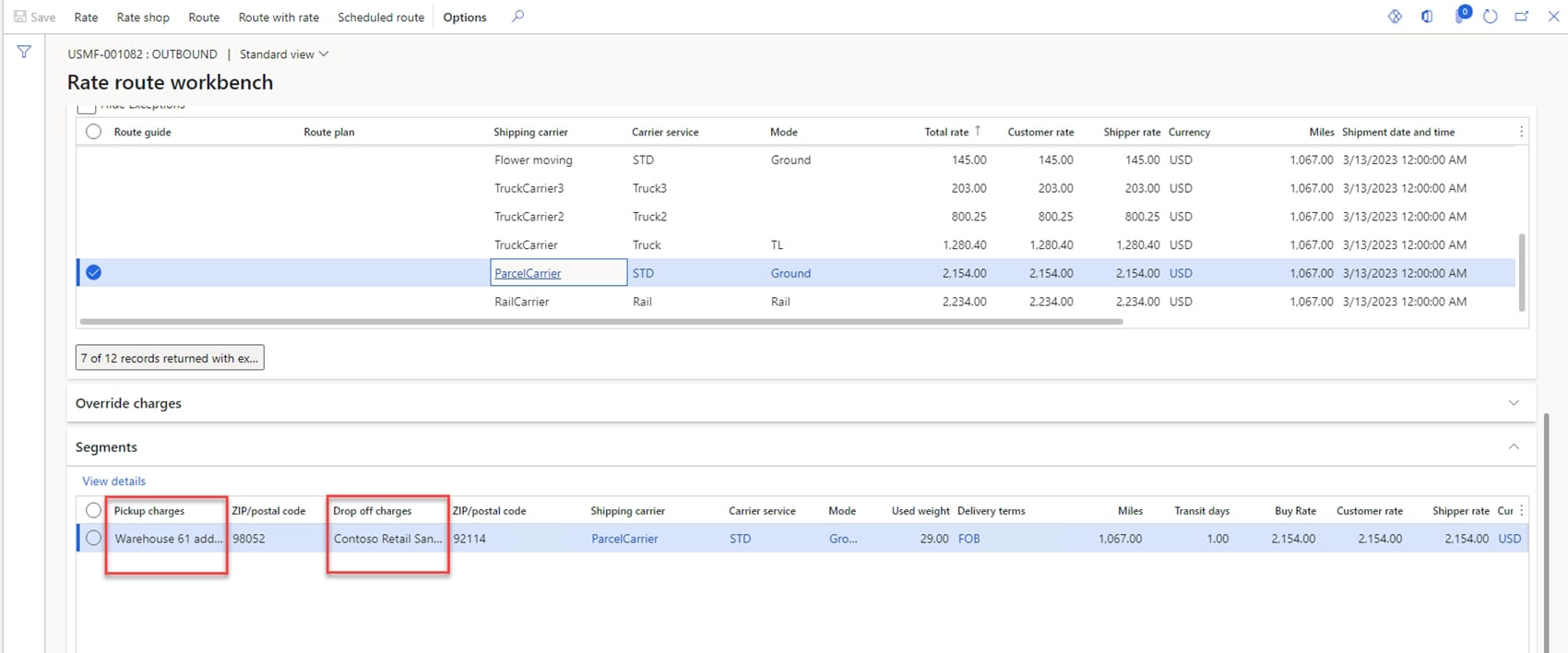
The first type of transportation is full truckload (FTL). FTL shipping is when a shipment takes up an entire truck by itself. FTL shipments are typically used when there are ten or more pallets or when the pallets are oversized and/or overweight. This type of transportation involves a single consignee. For such transportations, a route can be created using the Rate Shop and the Route With Rate functions of the Rate Route Workbench functionality. The Rate Shop function calculates route/transportation costs for all suitable carriers. The route and costs are calculated on the assumption that the route consists of one segment. You can then select and assign the best possible route in terms of time/cost from all the offers of the carriers configured in the system. The Route With Rate function selects routes from the configured route plan with the set number of segments and calculates costs for the selected carriers on the segments of the route plan. If no carrier and carrier service are set for route segments, the Route With Rate function does not calculate transportation costs for all suitable carriers like the Rate Shop function does. Since there is only one consignee in the transportation, all route segments are used to transport the shipment to this consignee. For this type of transportation, both route tasks can be fulfilled.
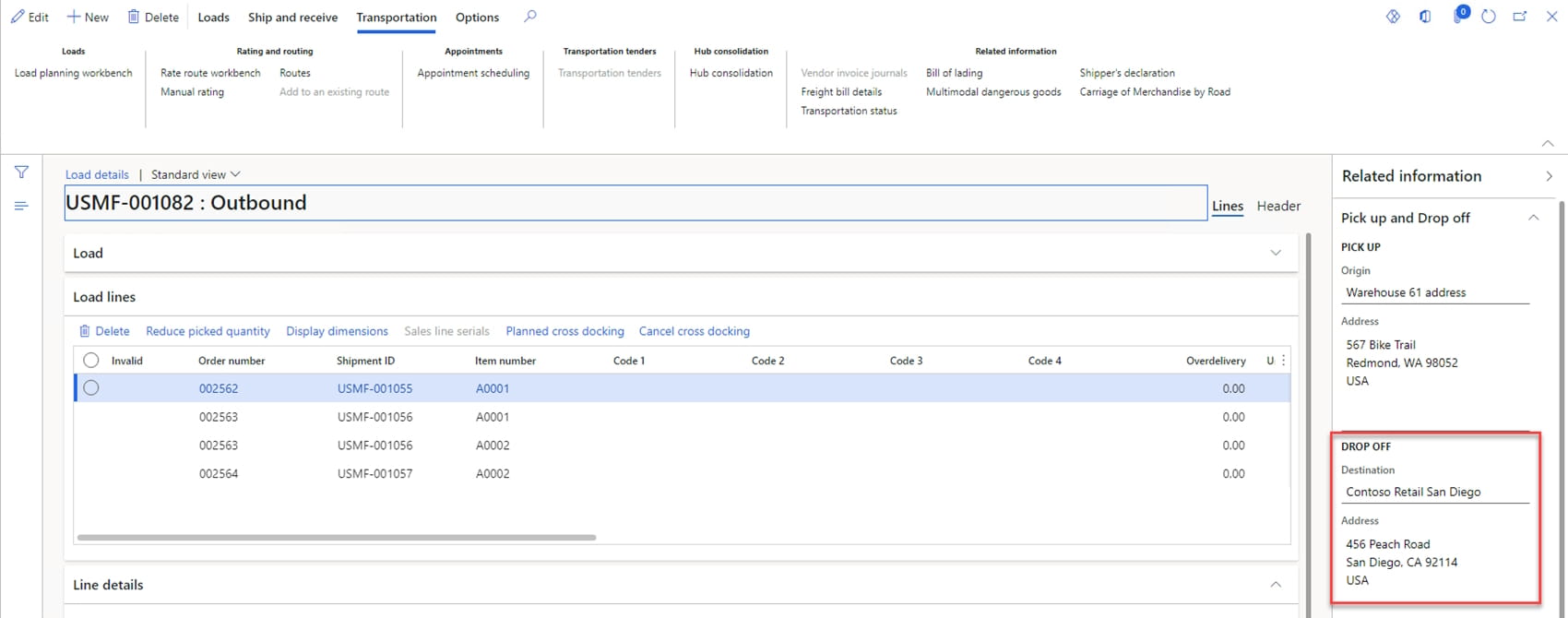
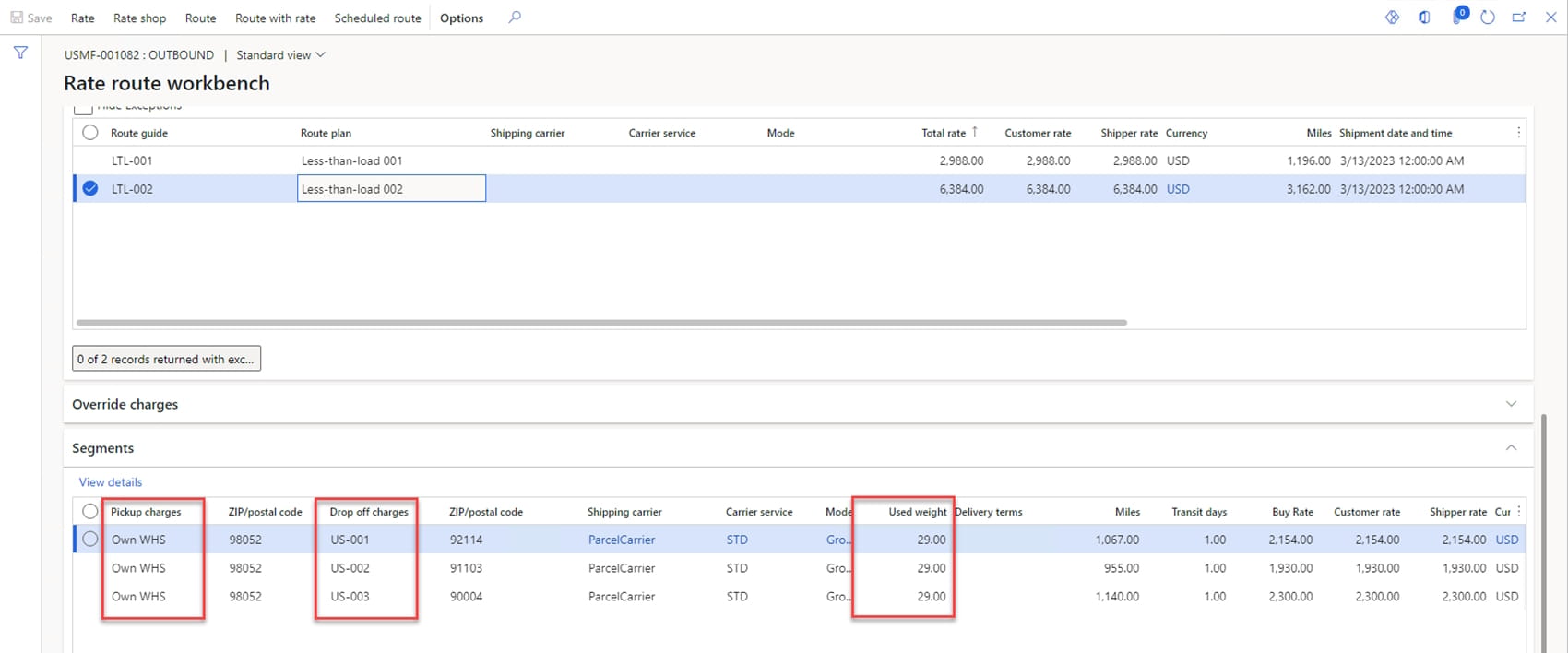
The second type of transportation is less-than-truckload (LTL). LTL is the transportation of freight that combines shipments from multiple customers in a single truck. LTL cargo is usually packed on pallets. Let’s look at a scenario where the transportation is intended to deliver shipments to each consignee. In our example, let’s consider a cost calculation for a load with three consignees (US-001, US-002, US-003). D365 SCM assigns the delivery address of one of the consignees as the arrival address for the load.
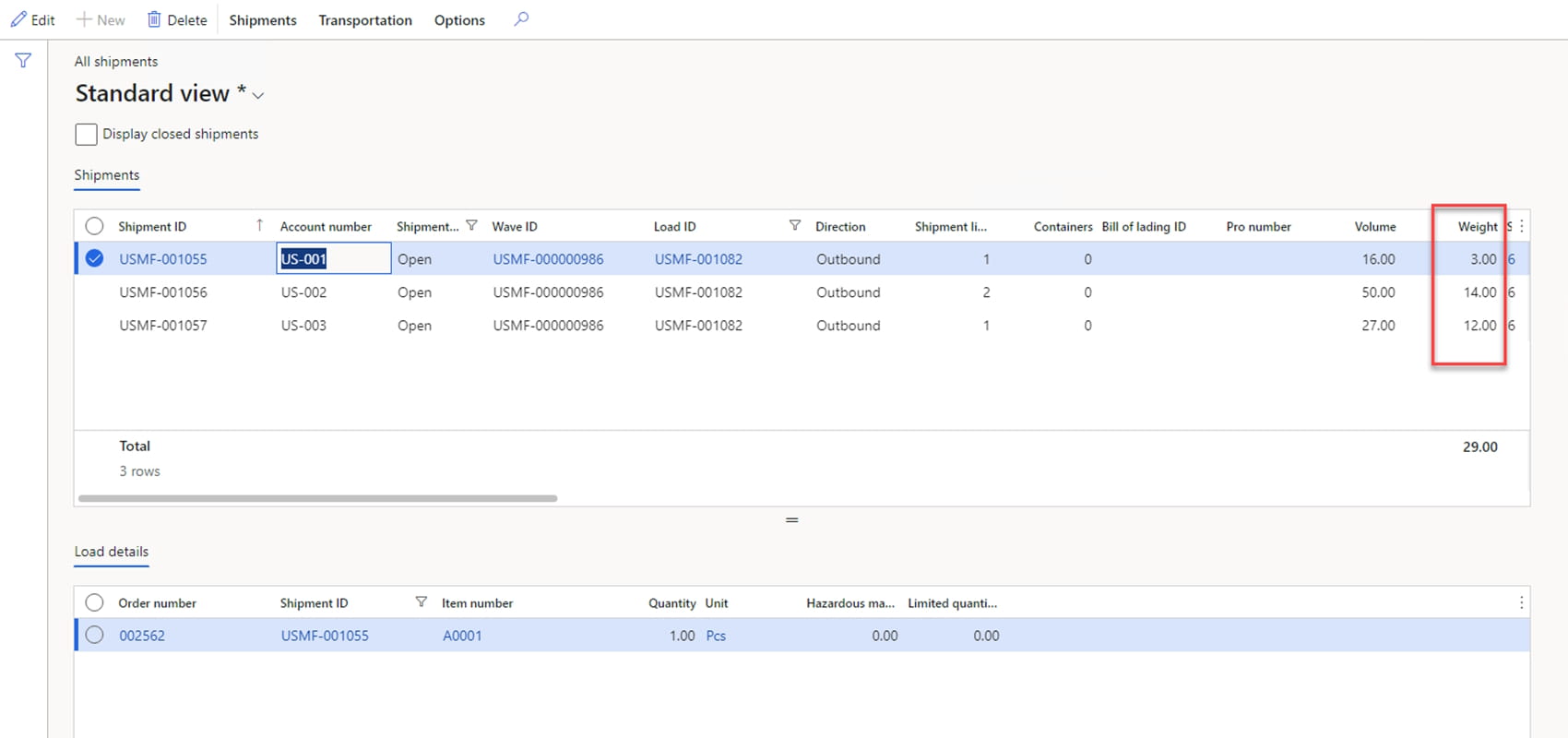
Weight of shipments:
The route for this type of transportation consists of different segments with each consignee’s delivery address. For such transportations, the route is created using the Route With Rate function of the Rate Route Workbench functionality. The Route With Rate function selects routes according to the configured route guides and route plan. The subtlety of the route plan setting is how the costs per segment should be calculated:
- If costs are to be calculated along the path of the route, then a route must be created with segments where the departure address is the arrival address of the previous segment, starting from the second segment onwards. It should be noted that the system calculates costs for all goods in the load per segment, in our example the weight is 29 units. In this case, the route performs both of its tasks.
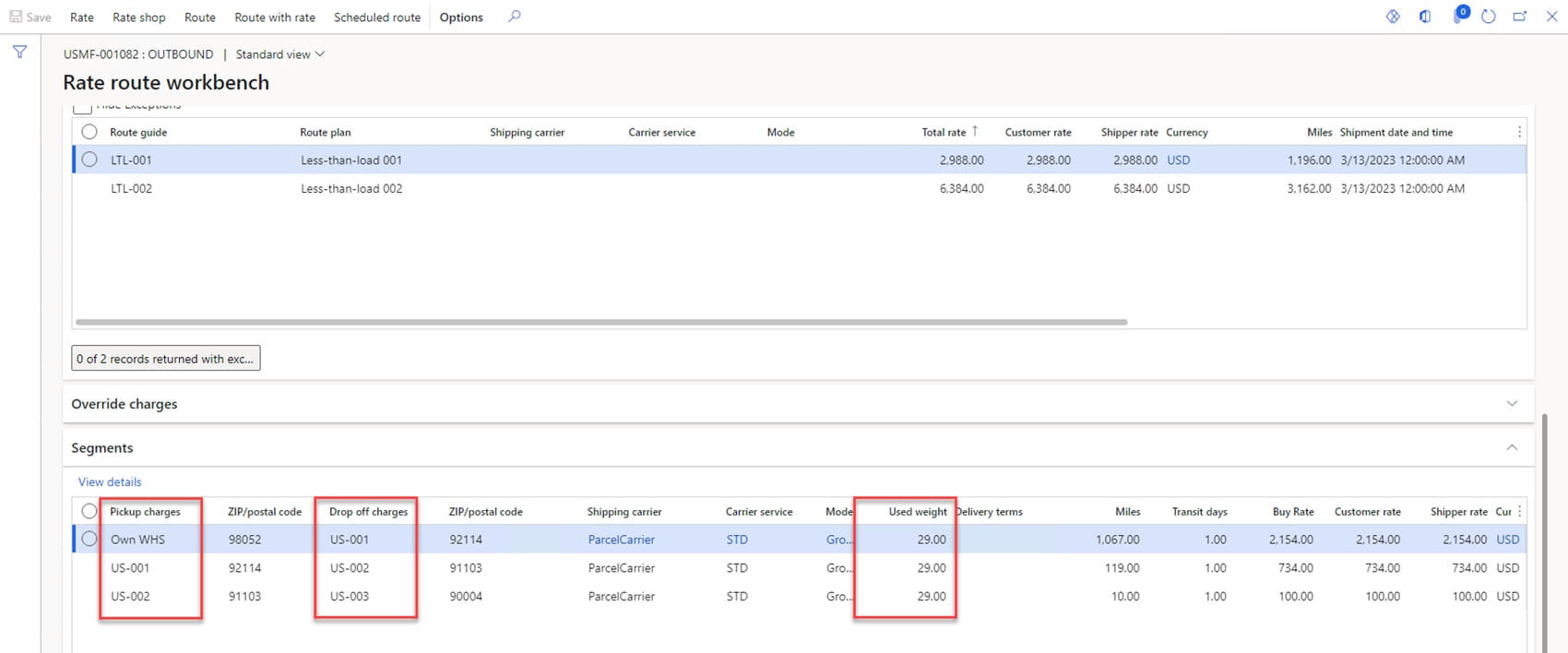
- If transportation costs are to be calculated for each consignee between the shipping warehouse address and the consignee address, all route segments will contain the warehouse address in the departure address and the consignee address in the arrival address. In this case, as in the previous one, the system does not allow shipments to be identified with the arrival address of the segment and the cost calculation is performed for all goods in the load per segment. In my opinion, such a route would only be useful for transportation cost calculation – it would not be logical to use it to track the execution of the route, as all segments would have the same departure point (i.e. the shipping warehouse address).
The Rate Shop function cannot be used for this type of transportation, as it calculates the route and costs on the assumption that there is only one consignee whose delivery address is specified for the load when it is created in the system.
The third type of transportation is parcel. Parcel shipping has historically involved packages that weigh less than 150 pounds and can be lifted without assistance. This means that packages are typically smaller than what LTL shipping handles. The parcel type of transportation can be executed in a number of ways. Let’s look at two common options:
- Option 1. The company fulfils each order individually and sends a delivery request to an express delivery company. This transportation option is implemented using the functionality of the Small Parcel Shipping feature. A new rate engine must be developed to interact with the carrier’s system. The rate engine retrieves the shipping label, shipping rate, and tracking number from the carrier’s system. The return transportation cost is added to the relevant sales order as a miscellaneous charge. For this option, the system does not generate a route and does not calculate costs for it.
- Option 2. The company generates its own last-mile delivery loads for parcels delivered to different consignees and calculates a required delivery route. To calculate the route and its costs, the Route With Rate function should be used, as in the case of the LTL type of transportation. The peculiarity of this option is that in most cases the route is unique for each load and the route plan and route guide are used once, so it is necessary to mark the load and the route guide somehow in order to perform the cost calculation using the Route With Rate function. To calculate the optimal route for the delivery of parcels, a solution to the Traveling Salesman Problem (TSP) must be implemented in the system, but this topic is outside the scope of this article. The creation of an optimal route can be made easier by implementing integration with cartographic search services. Different regions and countries may have their own preferred services, depending on their specific parameters. When creating route segments in the system, it is important to understand which departure address should be specified – the previous consignee’s address or the origin departure address. This problem is described above for the LTL type of transportation.
In non-standard cases where a one-time route needs to be created for a shipment, the TMS functionality provides the ability to manually create a route on the Routes form and specify hub masters for departure and arrival on route segments. The created route can be assigned to an inbound load using the Add to Existing Route function. For manually created routes, the Rate Route Workbench functionality does not calculate costs, costs can be entered manually via the Route Rate Details form. However, for outbound loads, there is no way to assign a manually created route on the Routes form, it is only possible to manually enter costs using the Manual Rating function and the system will create a route with one segment.
In my opinion, the cost calculation in the TMS module is implemented on the assumption that all cargo is delivered to the end point of the route, as there is no possibility in the system to link shipments to segments. In cases where the transportation is intended to deliver goods to different consignees, the route cannot always fulfil both of its tasks, and we have examined above why this is the case for the LTL type of transportation. An alternative way of implementing a solution to these two tasks in the TMS module is to use two entities as it is done in the Landed Cost module: Journey to create the route, and Autocost to calculate the costs, but using only two types of routes – one for cost calculation and another for movement along the route points.
Customize, optimize and unlock the full potential of your Dynamics system with our expert guidance.