


Functional Testing Reinvented: MCP & Copilot in Real Project Scenarios
Functional testing is often where Dynamics 365 projects slow down – not because of complex logic, but due to manual test execution. In this article, Yuliana Voronova, Senior Functional Consultant at ICS, demonstrates how MCP and Copilot help automate and accelerate initial functional testing in our projects.
 15 Jan 2026







The Role of MCP & Copilot in Functional Testing
After development is complete, functionality is still not ready for full validation by consultants or business users. At this stage, developers perform initial testing of basic scenarios to ensure the system runs correctly and the logic is implemented as expected. This phase is often referred to as smoke testing.
The idea behind smoke testing is straightforward: developers validate the basic operability of the solution first. Key scenarios are executed, core processes are run, and critical issues are identified immediately.
Why is this so important?
First, early testing helps detect issues at the earliest possible stage – before the functionality reaches consultants. This reduces the number of iterations and prevents rework that typically occurs when problems are discovered too late.
Second, it provides fast confirmation that the logic is implemented correctly. Developers can fix issues immediately without waiting for manual testing cycles and approvals.

Third, smoke testing frees up consultants, allowing them to focus on deeper validation: business logic, complex scenarios, and integrations. Basic checks are already completed, and consultants receive functionality that is ready for proper evaluation.
In practice, however, this process is often slowed down not by errors in logic, but by routine test data preparation, manual execution of steps, and dependencies on other team members. Even simple checks turn into time-consuming tasks that eat up effort and increase the risk of repeated fixes.
This is exactly where MCP and Copilot provide real value. By automating data preparation and accelerating initial functional testing, smoke testing becomes a fast, predictable, and manageable process. Developers can focus on logic, while consultants focus on assessing business value.
The Role of MCP & Copilot in Functional Testing
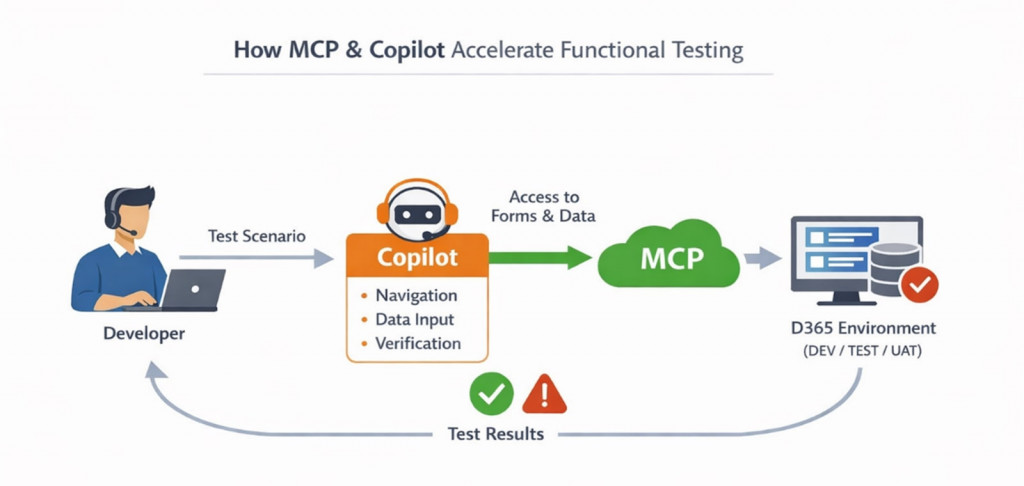
As we covered in the previous article, the Model Context Protocol (MCP) provides developers with direct access to data, forms, and actions in Dynamics 365. Copilot then turns this access into manageable testing steps: navigating forms, entering data, and validating values.
Developers can now instantly verify basic functionality without routine manual clicking, saving time and keeping focus on logic and solution quality. This is not classic test automation – rather, it is augmented manual testing, where AI accelerates traditionally slow and repetitive tasks while keeping control and decision-making with the human.
The diagram below illustrates how MCP and Copilot interact with the developer and the D365 system, making the testing process more controlled and predictable:
Challenges of Testing Transportation Management Solution in D365
Testing the functionality of [ICS] Transportation Package – our D365 add-on solution for Transportation Management – is one of the most resource-intensive tasks for ICS Product Team, as the correct calculation of optimal routes depends on a large number of input data. Even a minor variation can significantly change the final outcome.
As part of developing the solution’s functionality, it was necessary to check how the system generates routes under different conditions. This requires creating sales orders with various parameters: different customers and addresses, weight and volume variations, combinations of items, and multiple load templates.
These details directly influence vehicle selection, load distribution across routes, and system behaviour in non-standard scenarios.
The sheer number of possible combinations turns manual test case creation and execution into a lengthy process. Designing scenarios, creating orders, validating dependencies – all of this takes time, requires concentration, and often leads to missed edge cases.
In practice, testing all scenarios means manually creating dozens of orders and reproducing many variations. And this is precisely the stage that MCP and Copilot can dramatically accelerate and make more manageable.
Prompt Examples and Execution Results
Using MCP and Copilot significantly reduces the amount of manual work involved during initial testing by automating order creation, combinations generation, and data validation.
To demonstrate this in a real project context, let’s look at an example of generating complex test cases with different customers, items, and volumes.
Test Objective
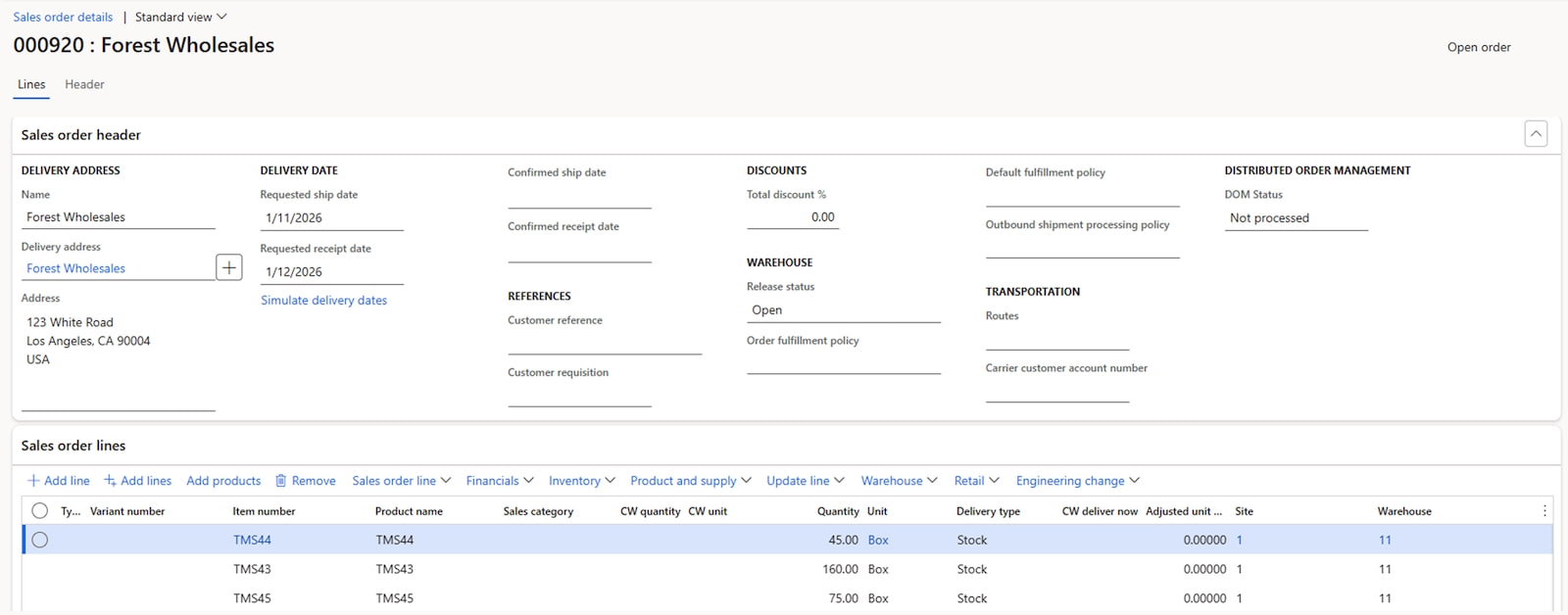
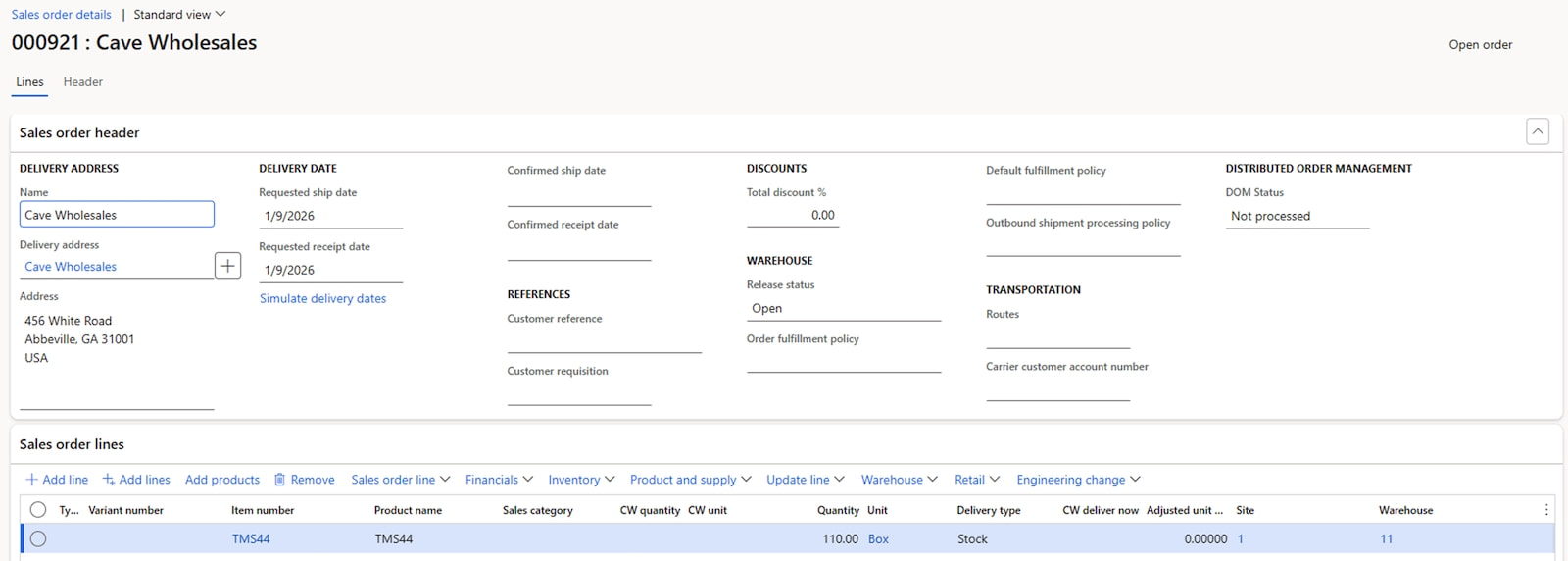
Automatically create multiple sales orders for customers US-001, US-003, US-004.
Each order must contain a different number of lines formed from a set of items: TMS43, TMS44, TMS45.
The quantity of items must also vary – from 20 to 200 boxes.
Warehouse parameters are fixed: Site = 1, Warehouse = 11.
This setup represents a real scenario for our Transportation solution, where the variety of input data determines how the system will select transport, create routes, and calculate loads.
Sample Prompt
A multi-step prompt was used, first asking Copilot to generate a test plan and then execute it:
1. Use the following input data for generating sales orders:2. Before creating any records, generate a randomized plan for all 3 sales orders:3.Present the generated plan in a clear structured format:4. After the plan is generated and shown, proceed with execution: |
Result
As a result of executing the prompt, Copilot:
➤ Generated a structured test plan for creating orders with randomized combinations of customers, items, and quantities.
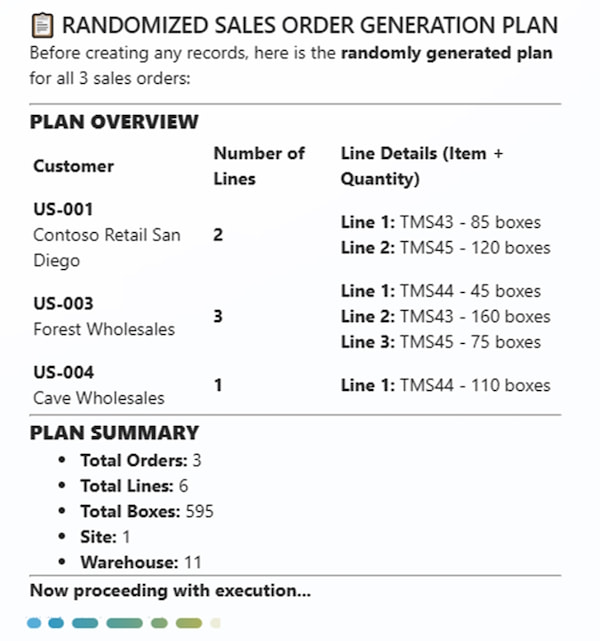
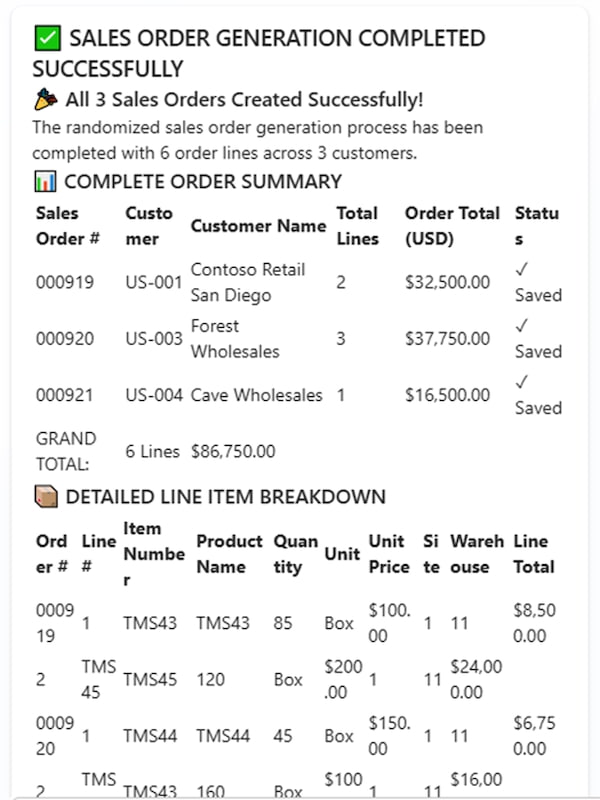
➤ Created all sales orders in USMF.
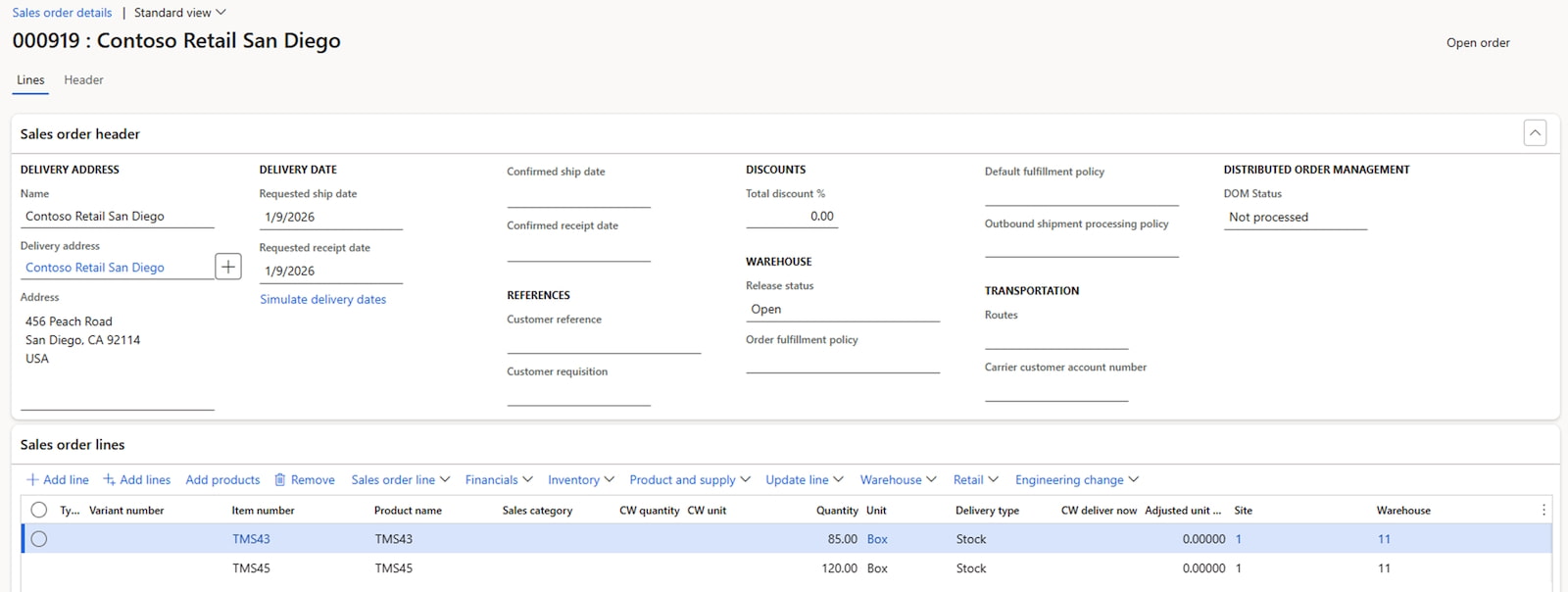
➤ Added order lines exactly as planned.
➤ Returned a final structured summary with sales order numbers and line details.
Outcome
The result was a fully prepared data set for testing route planning: three correctly created sales orders with different customers, unique item combinations, and varying volumes plus a structured Copilot report that can be reused as test documentation.
All results were obtained automatically, with no manual data entry involved, providing the developer with immediate feedback and allowing to proceed directly to route planning logic validation.
And it took just a few minutes instead of tens of minutes of manual preparation.
Benefits and Limitations
| Benefits | Limitations |
|---|---|
| ✅ Significant acceleration of initial functional testing Repetitive creation of test cases and execution of basic test steps is handled by AI, delivering feedback within minutes. ✅ Reduced team load and fewer iterations Logic is validated before handover to consultants, minimizing rework and bug-fix cycles. ✅ Standardized and repeatable process Data and reports are generated based on a single scenario, eliminating human error, random omissions, or fragmented approaches. ✅ Logically correct, test-ready data Entity dependencies are respected, and valid combinations are generated. ✅ Transparent results Each step, value selection, and created record is captured in a structured report that can be used as test documentation. | ⚠️ Prompt quality and detail is critical Unclear prompts lead to incorrect data or errors. Scenarios for reproducing test cases must be described precisely. ⚠️ Data volume limitations per run As in the Vehicle Type example described in our previous article, large datasets may need to be split into multiple executions to avoid errors. ⚠️ Not full test automation MCP and Copilot only accelerate the initial testing of basic scenarios but do not replace full functional testing by consultants or business users. |
Conclusion
Using MCP and Copilot during initial functional testing removes a traditional project bottleneck – manual execution of tests and validation of numerous data combinations.
The approach speeds up the transition from development to logic validation, reduces team workload, and makes early testing more predictable and controlled.
For our Transportation Management projects in Dynamics 365, this is not just automation – it is a practical way to improve team efficiency: developers get fast, structured and reliable validation, while consultants focus on complex scenarios and business logic.
The sheer number of possible combinations turns manual test case creation and execution into a lengthy process. Designing scenarios, creating orders, validating dependencies – all of this takes time, requires concentration, and often leads to missed edge cases.
In practice, testing all scenarios means manually creating dozens of orders and reproducing many variations. And this is precisely the stage that MCP and Copilot can dramatically accelerate and make more manageable.

If you’d like to learn more about how we apply AI tools in Dynamics 365 projects, or discuss how they could support your implementation, feel free to email our team.
Customize, optimize and unlock the full potential of your Dynamics system with our expert guidance.